

Fresh from rewilding the web, I updated the Recoil self-hosting infrastructure that Nick Ludlam and I have run since 1997. Most exciting, this is now 'email the hard way' that includes getting our very own dedicated IPv4 allocation routed thanks to my buddy Thomas Gazagnaire helping out from France!
This post will be quite technical, aimed at those interested in building their own email stack. We'll talk about why bother running your own email; receiving email (covering IP reputation, getting our own IPv4 allocation, stopping bots, and Sieve delivery); sending email reliably with SPF, DKIM, DMARC and SRS; user access via Dovecot IMAP and Roundcube webmail; and finally what's left to do and a reflection on future research ideas.
1 Why run your own email?
For someone just getting into systems and networking, it's a hugely educational experience. Running my own servers has been how I've learnt how the Internet works, and how I got into open-source back in the day, by installing OpenBSD and fixing bugs in PHP!
More broadly, self-hosting is important for sovereign access to your own data as the web steadily consolidates among a few players. A 2023 analysis showed that two companies can mostly read all of your email traffic:
So all in all, the answer to the question of who can read your email pretty much boils down to -- yep -- "Google and Microsoft". Even if your domain doesn't use one of their mail servers, chances are that whoever you are sending mail to does. -- MX diversity, Jan Schaumann, 2023
Email is right at the centre of our digital lives; consider just how many online accounts you could reset if your email got hijacked or phished. In many ways, it's the online service that connects up all the other ones.
1.1 Should you run your own email?
Hosting your email is a fair bit of work, but that's spread over a long period of time as you keep an eye on it. Nick Ludlam and I started our hosting adventure back in 1998 or so when we worked at NASA for the summer. The first time we did a major server move back in 2002, here's Nick and Chris Luke loading up our second server into a dodgy white minivan to host in Easynet, right outside London's first Internet cafe.

If you do decide to have a go for yourself, you'll need to find stable Internet hosting (your own home network isn't the best choice, for reasons we'll see later in this post), and also build up a reputation. Luckily, finding stable Internet is much easier these days than it was in the late 90s, and we use Mythic Beasts who are excellent, reliable and local.
I'll explain in this post how we obtained our own dedicated IPv4 address block to help build up a high deliverability index for our personal email that's entirely independent! While email looks like one service to most users, it is actually three separate activities: email receipt, email submission, and email access. I'll dive into how each of these work on Recoil now, in case it's useful for your own setup.
2 Email receipt
Each domain (like recoil.org) on the Internet runs an SMTP server that allows
it to receive email from other servers. You can query this server for any
domain by looking up its 'MX' DNS record:
$ host -t mx recoil.org
recoil.org mail is handled by 10 pork.recoil.org.
This indicates that the Internet host pork.recoil.org must accept connections from any server
on the internet that wishes to deliver email to <email>@recoil.org.
The core difficulty is that SMTP (as
designed in the more trusting 1980s) doesn't mandate a built-in proof of trust.
Anyone can claim to be anyone else, and the 'sender' in the email we receive
can be trivially forged.
The IETF's response was to accrete a stack of checks over the years that an email sender must pass, or be filtered by the recipient. If we mess these identity checks up, then our email won't get delivered reliably across the Internet and the service won't be very useful.
2.1 IP reputation and denylists
Spam was cheap to send from anywhere on the Internet, and so naturally grew as the wider network gained adoption. Paul Vixie came up with a DNS-based blocklist back in 1997. Since then, many more have sprung up, operated by organisations like Spamhaus, Spamcop and Barracuda that aggregate reports about botnets, compromised hosts and spammers into lists that any email server can consult.
The DNS blacklist/whitelist protocol (RFC 5782) is super simple and can be queried right from your command line:
$ dig 2.0.0.127.zen.spamhaus.org +short  # testing address
127.0.0.2
127.0.0.10
127.0.0.4
That's a localhost testing address, but the presence of a DNS record in the RBL means that that server is suspect. This is where having control of your own IPv4 address really pays off. Reputation for email via these RBLs accrues against the address and not the domain. In theory, the IP address you use for your own self-hosted email might have been re-used from a cloud provider by someone else, and therefore be tainted by other people's bad behaviour.
(Update: Ryan Gibb observes that as these lists often work on IP blocks, your IP neighbour can also effect your reputation in a multitenant cloud. He reports that he uses Hetzner for his use who manually allowlist SMTP servers to minimise abuse).
2.2 Getting our very own IPv4 address block
In contrast, a fresh IPv4 starts neutral and earns its reputation through
consistent, well-formed email sending. The only way to fully control this is
to control the address space itself, which is why Team Recoil now have our very
own IPv4 address block: 185.33.27.0/24!
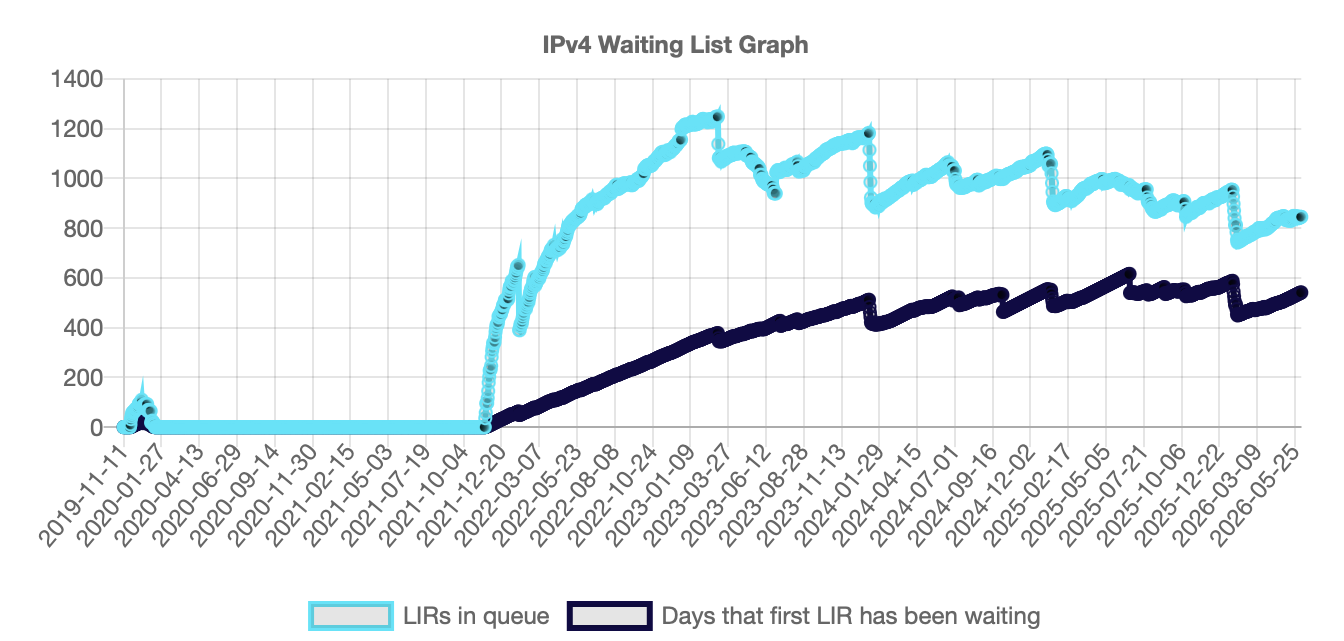
Getting our very own address allocation involved joining a very long queue due to IPv4 exhaustion. The RIPE NCC is the regional registrar for Europe and ran out of unallocated IPv4 space in November 2019, and since then the only way to get an allocation directly from RIPE is via a waiting list for small allocations.
While we have run out of IPv4 addresses, RIPE NCC members can still request a single /24 allocation (256 addresses). [...] Requests are added to a waiting list and processed when we recover IPv4 addresses in the future. [...] This is only available to LIRs that have never received an IPv4 allocation from the RIPE NCC before (of any size). -- RIPE NCC, /24 Allocation via the Waiting List
I got into that queue from the UK, and my buddy Thomas Gazagnaire did the same from France.
He got to the head of his queue well ahead of me, and we got allocated our
own /24 block after about a six month wait.
2.2.1 Signing up to RIPE for yourself
If you want to do this yourself and are based in Europe, then pay the annual RIPE NCC membership fee to open a Local Internet Registry (LIR) account.
After that, confirm you've never previously received an IPv4 allocation, join the waiting list, and wait until enough addresses are recovered (e.g. from defunct LIRs, returned space, or revoked allocations) for a slot to come up. The wait is currently a year or two I think and seems to depend which country you're in.
2.2.2 Setting up IPv4 routes for an autonomous system
The next step was to route this allocation to an actual machine hooked up to the public Internet. While it is possible to advertise our own routes, in the interests of expediency we decided to request Mythic Beasts to take care of it for us and handle the peering.
The procedure to do this via RIPE is straightforward. The IPv4 block is given an assignment by creating a 'RPKI ROA' in their database. This is a PKI chain-of-trust used to connect up IP routing blocks on the Internet.
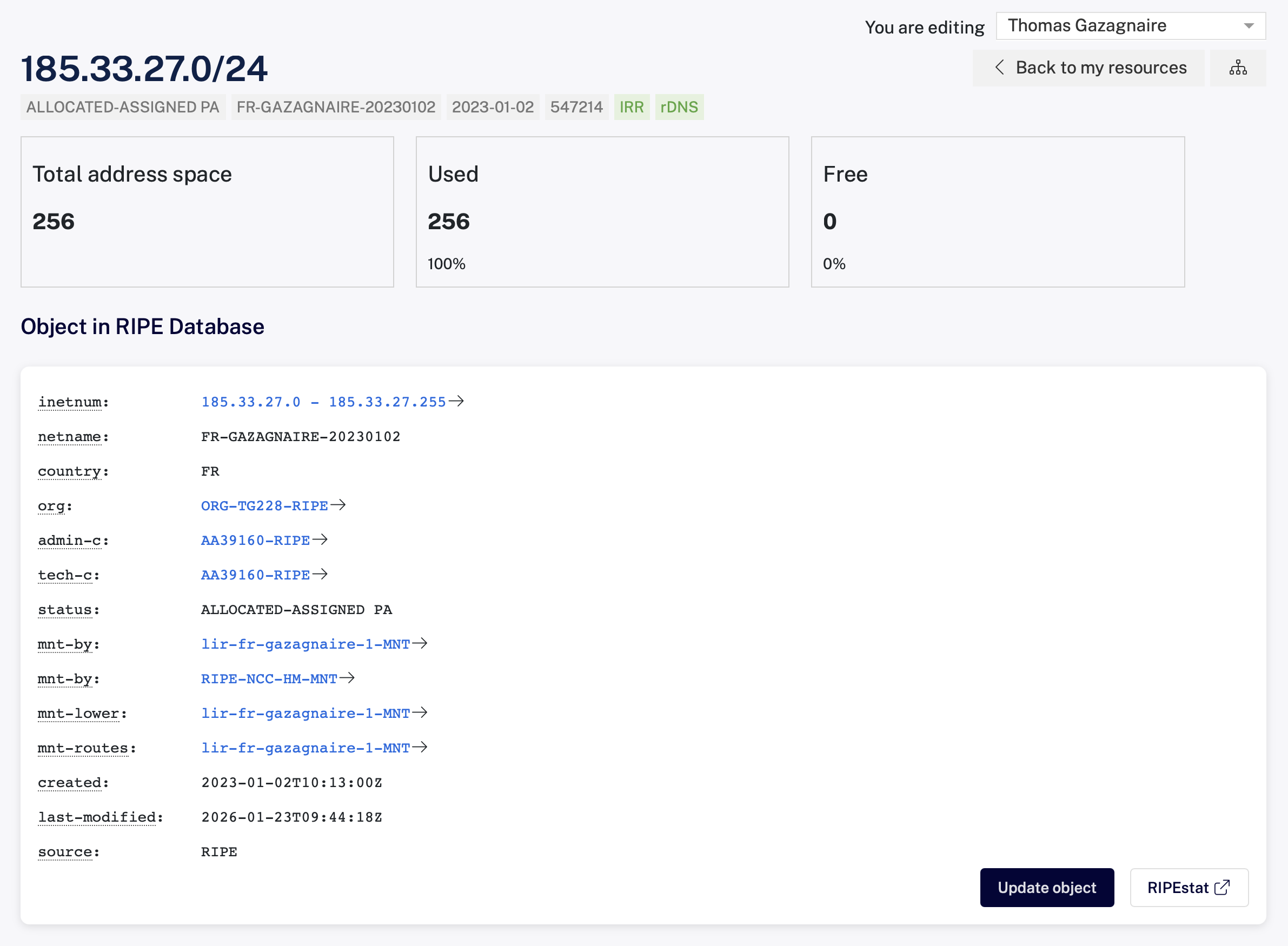
An Autonomous System (AS) is a unit of independent routing policy on the Internet and announced to the rest of the world via BGP. Working out who actually owns a given ASN turns out to be surprisingly hard as the WHOIS databases are inconsistently updated, but third-party databases exist to help. In our case our IP block is connected to the Mythic Beasts AS44684.
Once that was sorted, RIPE once again uses DNS to announce the connection to Mythic:
$ dig soa -x 185.33.27.0 @pri.authdns.ripe.net +noall +authority
27.33.185.in-addr.arpa.	86400	IN	NS	ns1.mythic-beasts.com.
27.33.185.in-addr.arpa.	86400	IN	NS	ns2.mythic-beasts.com.
Another nice aspect is being able to control our own reverse DNS to this IP block, which is another important signal for email reputation:
$ host pork.recoil.org
pork.recoil.org has address 185.33.27.128
pork.recoil.org has IPv6 address 2a00:1098:39c::3
$ host 185.33.27.128
128.27.33.185.in-addr.arpa domain name pointer pork.recoil.org.
2.3 Stopping the Zombie spam horde
We've so far gone to an enormous amount of hassle to get a clean IPv4 block, but this is necessary but not sufficient to protect ourselves! We also need to configure our server to defend itself against the zombie botnet hordes.
The overwhelming majority of incoming TCP connections on port 25 are botnets attempting to deliver spam, probe for open relays, guess credentials (or more recently) harvest data for AI training. Spending CPU cycles parsing the body of every one of these requests is both wasteful and dangerous, so a good setup will try to filter these out as early as possible.
We first deploy Postfix's postscreen, which listens on port 25 as the first port of call. Architecturally it's a protocol proxy that accepts the TCP connection, runs a battery of cheap checks:
- DNSBL lookups in parallel from multiple providers
- adds a deliberate pre-greet pause from RFC 5321 §3.1 that catches bots which start talking before the server's banner appears
- a couple of pipelining and non-SMTP-command tests to check for compliance
It only hands the connection off to the real smtpd process if the client looks legitimate after
these. Bad clients are dropped during the pre-greet pause with a temporary failure, which
will encourage false positives to retry in the future.
Interestingly this proxy is exactly what we do in Docker for Desktop, where a userspace OCaml VPNKit proxy mediates between containers and the host network without exposing the host stack directly. I'm going to reimplement postscreen in OxCaml soon...
For those configuring your own server, the relevant Postfix knobs are in main.cf:
postscreen_dnsbl_sites   = zen.spamhaus.org*3 bl.spamcop.net*2 b.barracudacentral.org*2
postscreen_dnsbl_action  = enforce        # reject when DNSBL score crosses threshold
postscreen_greet_action  = enforce        # reject pre-greet slammers
The *3 and *2 weights let us combine blocklists rather than trust any single
source; in the above we trust Spamhaus alone and the two weaker lists need to both agree to
reject.
Just postscreen by itself seems to reject over 90% of incoming spam requests, but there's
another trick we can apply.
One minor wrinkle that Nick Ludlam noticed is that Apple's iCloud email service interacts badly with postscreen. Apple's outbound MX pool that delivers email doesn't retry from the same IP, which means postscreen's allowlist for that connection never matches and mail can stay in limbo for hours. This isn't really a misconfiguration on our end, but it affect users badly.
The fix (since Apple still owns the whole of 17.0.0.0/8!) is to allowlist that whole range up front in
postscreen_access.cidr so it bypasses the protocol tests entirely. The
mailcow allowlist guide
walked me through the syntax in case you hit the same problem:
# /etc/postfix/postscreen_access.cidr
17.0.0.0/8    permit       # Apple iCloud MX pool is somewhere in here
2.3.1 Greylisting
Once a connection survives postscreen, our next defensive layer is greylisting (RFC 6647), implemented for us by rspamd. The idea is that the first time we ever see a particular source, our server returns a temporary failure rather than accepting the message, and records the source for future reference.
Legitimate MTAs are required by RFC 5321 to queue/retry after a few minutes. When the retry comes in, we'll have seen it from the first attempt and then let the message through. A large fraction of botnets are "single-shot" delivery engines that just move on to the next victim when they get a failure, since maintaining a retry queue is expensive when you're shotgunning millions of messages. The cost to a real sender is a one-time delay of a few minutes, which is amortised across all users from that source (the greylisting only happens to the first sender).
All these mechanics are implemented in rspamd, which itself has a nice local connection: its author Vsevolod Stakhov did his PhD in the CL with Jon Crowcroft and me, and I spent much time back in 2015 working with him with HTTPCrypt, a scheme for opportunistic HTTP encryption that uses NaCl-style cryptography to skip the full TLS handshake by passing the server public key out-of-band (typically via DNS). The paper got soundly rejected from USENIX Security 2015 for reasons I can't remember but weren't very important, but the protocol lives on as the encryption layer between rspamd and its clients!
Ok, so now by the time a message has survived postscreen and greylisting, well over 99% of the original bot traffic has been turned away at the door for a tiny fraction of the CPU cost of actually reading it. After this, we still need to do a bit of work scanning the content itself.
2.3.2 Milter, ClamAV and Bayesian filtering
Everything that makes it past postscreen and greylisting gets handed to rspamd over the milter protocol. Our postfix is configured to consult rspamd for every message, which allows rspamd to either hard reject or defer a delivery while the sending server is still 'on the line'
This allows dodgy mail to be refused at the source rather than accepted for delivery and then bounced afterwards (which is unreliable, as the bouncing address may also be fake and cause backscatter spam to be generated by us!).
The Postfix configuration for this milter is as easy as running the rspamd daemon configured to listen on localhost.
# /etc/postfix/main.cf
smtpd_milters        = inet:localhost:11332

clamd daemon over a Unix
socket, and rejects outright on a virus hit so the message is never delivered.
# /etc/rspamd/local.d/antivirus.conf
clamav { type = "clamav"; servers = "/run/clamav/clamd.ctl"; action = "reject"; }
The other main filter (among many) is rspamd's "Bayesian classifier" that scores each incoming message against a dynamic corpus of known spam and ham messages stored in Redis. The classifier auto-learns from messages that score extremely high or low, but it can also be personalised by the Recoil users by keeping an eye on each user's Junk folder and adding those to the classifier.
These messages are learnt by being piped to the rspamc command, which can
learn both ham and spam on stdin. Over a few weeks of doing this on every
false-positive (or false-negative), the classifier gets pretty good
at matching what our users want to see without having to maintain a static database.
$ rspamc stat
Results for command: stat (0.028 seconds)
Messages scanned: 6206
Messages with action reject: 135, 2.18%
Messages with action soft reject: 0, 0.00%
Messages with action rewrite subject: 0, 0.00%
Messages with action add header: 137, 2.21%
Messages with action greylist: 658, 10.60%
Messages with action no action: 5276, 85.01%
Messages treated as spam: 272, 4.38%
Messages treated as ham: 5934, 95.62%
2.4 Delivering email with LMTP and Sieve
Once our intrepid email message has run the gauntlet of postscreen, greylisting, rspamd, ClamAV and Bayesian classifiers, we finally get to actually send it to the right user.
By default Postfix would just write the file straight into the user's home directory, but that's not much use in the modern world where the volume of email most people receive means that we'd like to file them into folders.
We therefore hand the message over to Dovecot via LMTP, which is basically SMTP (the protocol we used to receive the email from the outside world), but without the queueing complexity. This handoff happens over a normal Unix domain socket that's inside Postfix's queue directory:
# /etc/postfix/main.cf
virtual_alias_domains = recoil.org
virtual_alias_maps    = hash:/etc/postfix/recoil.org
mailbox_transport     = lmtp:unix:private/dovecot-lmtp
virtual_alias_maps turns an arbitrary anything@recoil.org address into an
address that can be delivered locally (e.g. anil@recoil.org goes to avsm@pork.recoil.org).
The reason for handing off to Dovecot rather than letting Postfix write the maildir directly
is that Dovecot then owns the local user operations of indexing, quotas, full-text search and Sieve
filtering. We'll come back to this in the email retrieval section.
2.4.1 Durable on-disk storage with Maildir
Our storage format on disk is the reliable old Maildir
format, which stores each email as a single file under each user's ~/Maildir. It's a format
that we've been using on Recoil since 1998, when we first used qmail as our mail server.
The reason I like it so much is that processing libraries are
trivial to write, so email is never locked up in a proprietary format or database over the march
of decades.
The format itself is minimal. Each ~/Maildir is just three
subdirectories tmp/, new/ and cur/.
/home/avsm/Maildir/.archive.2018
/home/avsm/Maildir/.archive.2018/tmp
/home/avsm/Maildir/.archive.2018/cur
/home/avsm/Maildir/.archive.2018/new
/home/avsm/Maildir/.github.mention
/home/avsm/Maildir/.github.mention/cur
/home/avsm/Maildir/.github.mention/new
/home/avsm/Maildir/.github.mention/tmp
...
The concurrency story is much simpler as POSIX guarantees local atomicity
of file rename operations. An incoming message
is first written to a unique file in tmp/, then once fully written is (atomically) renamed
into new/.
A client reading the Maildir then moves files from new/ into cur/ once
they've been seen. The message file itself is immutable, and so clients use the
filename to store message information by appending a flag suffix (e.g. :2,S
for Seen, :2,SR for Seen and Replied). With this setup, no user level mailbox-wide locking is needed and so
Postfix can deliver a new message without synchronisation while normal email
reading is going on.
2.4.2 Indexing the email with Flatcurve
I did evaluate some much more modern email servers like Stalwart which have tons of cool features, but ultimately decided against switching because they don't support Maildir. They instead require stashing email in a custom database format (e.g. in RocksDB) which (I think) mixes up the durability of email with having fast search. Instead, I took advantage of Dovecot support for full text indexing via a separate index, which is the Flatcurve full-text index.
Flatcurve is actually a wrapper around the venerable Xapian, which (like rspamd) is yet another locally developed Cambridge technology! Martin Porter (inventor of the famous stemming algorithm), did the Computer Science Diploma in the CL in 1967 and released the first version of Xapian in 2002. Note that there's no connection to our OCaml Xen XAPI toolstack which was developed by us independently in 2004!
In our setup, Flatcurve keeps a separate Xapian index per mailbox under
~/Maildir/fts-flatcurve and updates it automatically as new mail arrives.
The Dovecot side of the config is just:
# /etc/dovecot/conf.d/90-fts-flatcurve.conf
mail_plugins { fts = yes; fts_flatcurve = yes }
fts_autoindex = yes
Flatcurve also ships CLI tools as part of the Dovecot plugin to mess around with the index or do CLI searches (handy for agentic search!):
 $ doveadm fts flatcurve stats -u avsm INBOX
INBOX guid=436177290d20ee4e664a00007b9d9320 last_uid=1018743
messages=83485 shards=2 version=1
2.4.3 The Sieve language for server-side filtering
Before the message lands in the maildir, we also need to decide which folder to put it into, or do other preprocessing like labeling. Since this can get arbitrarily complicated based on the user's needs, we use a Pigeonhole Sieve plugin that runs user-defined delivery-time filters.
Sieve (RFC 5228) is a declarative language designed specifically for mail
filtering. There's a system-wide script that runs first and
files anything rspamd has flagged into Junk, and then each user's personal
script runs:
# /etc/dovecot/conf.d/90-sieve.conf
sieve_script spam-to-junk { type = before; path = /etc/dovecot/sieve/spam-to-junk.sieve }
sieve_script personal     { path = ~/sieve; active_path = ~/.dovecot.sieve }
# /etc/dovecot/sieve/spam-to-junk.sieve
require ["fileinto", "mailbox"];
if header :contains "X-Spam" "Yes" {
  fileinto :create "Junk";
  stop;
}
Running these rules at delivery time on the server means the same rules apply whether I'm eventually reading mail on my laptop, phone, or via webmail. I can also write Sieve rules for very custom vacation rules, email priorities, and coding agents like Claude can easily figure out the DSL intricacies. I found the Sieve cheatsheet very useful here: you can do things like modify messages, create dynamic folders and edit headers.
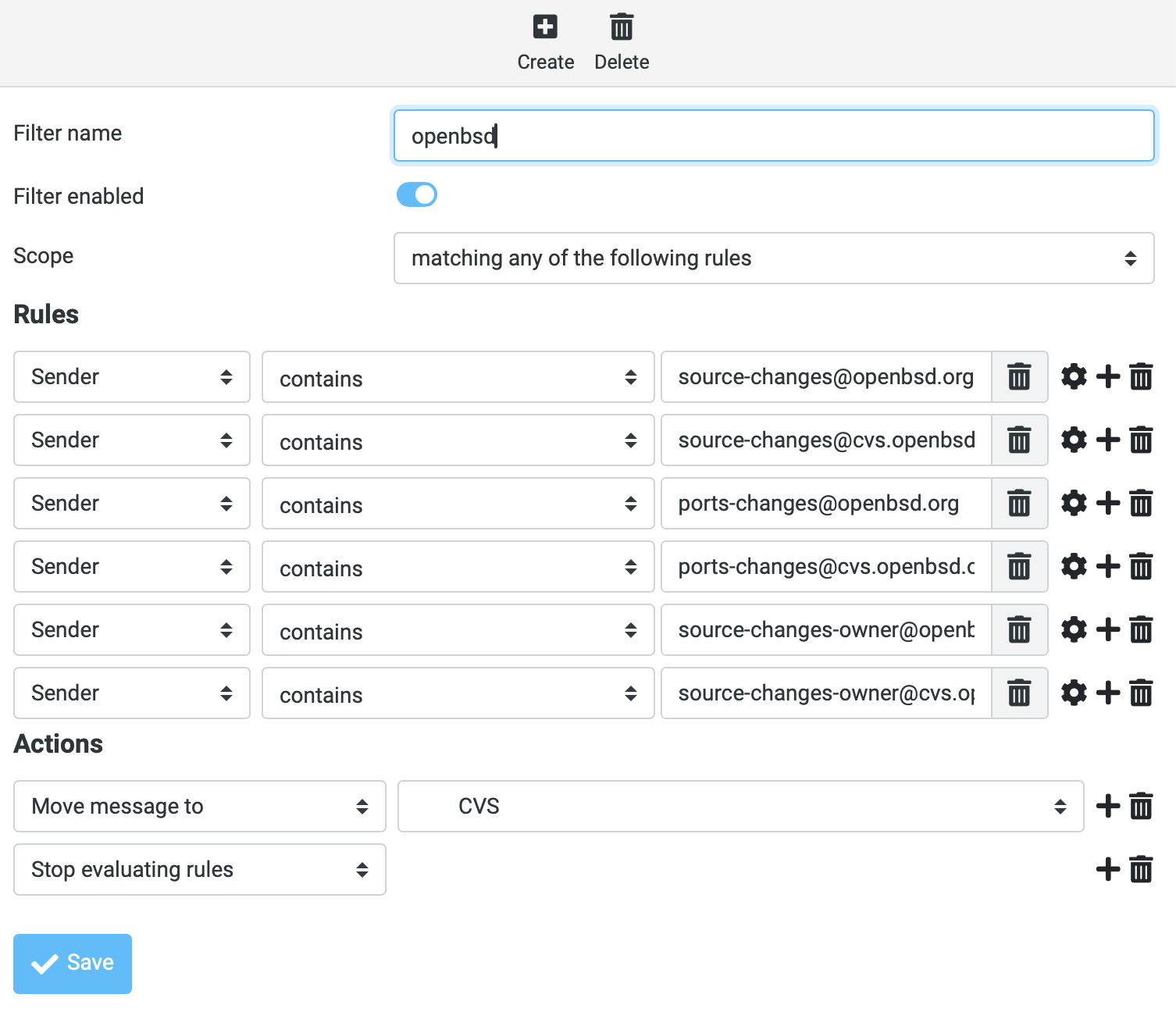
There's also a "ManageSieve" (RFC 5804) daemon running, which lets a mail client edit a user's Sieve script remotely without needing shell access. I got this working with both Thunderbird and Roundcube which bundles a plugin natively.
My email filter's massive, but I generate it from OCaml code that outputs something like:
if header :contains "List-Id" "caml-list.inria.fr"
{
        fileinto "dev.caml-list";
        stop;
}
if header :contains "List-Id" "types-list.LISTS.SEAS.UPENN.EDU"
{
        fileinto "lists.types";
        stop;
}
<...>
The Junk Bayesian training loop from earlier piggybacks on this too, as a Sieve
IMAP event
(RFC 6785) script fires on each
folder move, which then pipes the message to rspamc learn_spam or learn_ham.
This might all feel like a Rube Goldberg machine, but each component does have
its own specialised role.
3 Sending email to other people
We've so far put a stupid amount of effort into receiving email safely, but this wouldn't be much use if we also can't reliably send email that won't get rejected. Failing any one of the gauntlet of checks by the hyperscalers will send our mail to someone's spam folder or be quietly dropped. There are three separate protocols that work together to avoid this unfortunate outcome: SPF, DKIM and DMARC.
3.1 SPF describes who can send email for a domain
The SPF (Sender Policy Framework) protocol
is a DNS TXT record at the apex of our email domain which declares which IP addresses are
allowed to originate mail claiming to be from @recoil.org. As before, we can
query the live record for Recoil from the CLI:
$ dig +short TXT recoil.org
"v=spf1 a mx -all"
"Llamaz United"
$ dig mx recoil.org +short
10 pork.recoil.org.
The first one is the SPF record, and the second is a random record I created in
1999 to test TXT records. The SPF entry says that the only valid senders for
recoil.org are whatever hosts the MX records of recoil.org point to. In
our case this is just pork.recoil.org, and everything else is expected
to be illegitimate email not authorized by us.
It's possible to also declare a softer ~all softfail that lets receivers accept dubious mail with a
warning. This setup is safe for Recoil because we never send legitimate mail from anywhere except our
own mail server.
One little footgun is that we have lots of IP addresses bound to the pork.recoil.org host (because of the aforementioned /24 IPv4 block that we were allocated), and so the Postfix daemon needs to be bound specifically to one address to ensure that all of the outbound TCP connections it makes are indeed from the MX entry and not another address from our pool.
# /etc/postfix/main.cf
smtp_bind_address    = 185.33.27.128
smtp_bind_address6   = 2a00:1098:39c::3
Without these, Postfix would happily send out from whatever address the kernel decides to use, which might be the IPv4 we use for the webmail or some other service entirely, and the receiver's SPF check would fail...
3.2 DKIM: cryptographic signing of outbound mail
SPF only authenticates the connecting IP of the email server to other people, but says nothing about the contents of the message itself. We could still use a way to authenticate that a full message has been certified by Recoil as originating from us, even if that message has been through several other email relays (e.g. by being forwarded).
The DKIM (DomainKeys Identified Mail)
protocol adds a per-message cryptographic signature, in a DKIM-Signature:
email header. This covers a canonicalised form of the body and selected headers,
to permit some flexibility in rearranging the email but still be robust against
tampering. The public verification keys for DKIM live in the public DNS and so
are available for any receiver to easily check.
The job of signing every single message leaving Recoil is rspamd's job. Our DKIM private key lives on disk and never leaves the server. rspamd adds the signature to every outbound message during the same milter pass that scores inbound mail:
# /etc/rspamd/local.d/dkim_signing.conf
domain {
  recoil.org    { selector = "mail"; path = "/var/lib/rspamd/dkim/recoil.org.mail.key" }
}
Since you don't want to have the same private key in use forever, DKIM
supports rotation via "selectors" (mail in our case). This lets us rotate keys by
publishing a new public key under a new selector while keeping the old one
live, so signatures on already-sent mail still verify. The public side
lives in DNS at <selector>._domainkey.<domain>:
$ dig +short TXT mail._domainkey.recoil.org
"v=DKIM1; k=rsa; p=MIIBIjANBgkqhkiG9w0BAQEFAAOCAQ8AMIIBCgKCAQEA..."
One gotcha if you're setting this up yourself is that DKIM TXT records frequently exceed the 255-byte string limit and have to be split into multiple quoted strings inside one record. Most authoritative DNS providers will do that for you, but you may need to mess around in their various web UIs to figure out how.
Another oddity about DKIM is that it's really intended for live verification. If you want to go back and re-verify some emails that are (say) a few years old, then the DNS keys will have expired and so you won't be able to do so. If anyone knows of any DKIM transparency logs like exist for TLS, I'd love to try it to go back over my historical email and do some data mining.
3.3 DMARC ties it together and provides reporting stats
Neither SPF nor DKIM actually check the From: header that
decides what our users actually see in their mail client:
- SPF only authenticates the envelope sender (the
MAIL FROMSMTP command) - DKIM only authenticates the sending domain in its own
d=tag.
Without some glue, a spammer could pass the SPF check for their own evil.example.com,
then sign a message with a valid DKIM key for evil.example.com, and
still write From: anil@recoil.org in the message that the user eventually reads.
The protocol glue to prevent this is DMARC, which checks
that the domains authenticated by SPF and DKIM actually match the visible
From: in the email message, and also tells receivers what to do when the check fails.
As you might have guessed by now, this involved yet another DNS record:
$ dig +short TXT _dmarc.recoil.org
"v=DMARC1; p=quarantine; rua=mailto:postmaster@pork.recoil.org"
The strongest policy is p=reject, but we're going for a softer 'quarantine'
until I'm comfortable with the setup for a few more months.
A really useful part for actually debugging deliverability (given how many
third parties are involved here) is rua=, which is the email address for
a regular aggregate report.
Once a day or so, every major receiver who gets email from Recoil (including Google,
Microsoft, Yahoo, Fastmail, and some smaller ones) sends an XML report to
this address summarising the messages they saw claiming to be from
recoil.org.
Some of these actually look like valid fails; for example this one from Yahoo
seems to indicate that we've had some email sent not from our servers:
$ gzcat yahoo.co.uk!recoil.org!1780617600!1780703999.xml.gz
<?xml version="1.0"?>
<feedback>
  <report_metadata>
    <org_name>Yahoo</org_name>
    <email>dmarchelp@yahooinc.com</email>
    <report_id>1780732274.742817</report_id>
    <date_range>
      <begin>1780617600</begin>
      <end>1780703999</end>
    </date_range>
  </report_metadata>
  <policy_published>
    <domain>recoil.org</domain>
    <adkim>r</adkim>
    <aspf>r</aspf>
    <p>quarantine</p>
    <pct>100</pct>
  </policy_published>
  <record>
    <row>
      <source_ip>192.134.164.83</source_ip>
      <count>4</count>
      <policy_evaluated>
        <disposition>quarantine</disposition>
        <dkim>fail</dkim>
        <spf>fail</spf>
      </policy_evaluated>
    </row>
    <identifiers>
      <header_from>recoil.org</header_from>
    </identifiers>
    <auth_results>
      <dkim>
        <domain>inria.fr</domain>
        <selector>dc</selector>
        <result>pass</result>
      </dkim>
      <spf>
        <domain>inria.fr</domain>
        <result>pass</result>
      </spf>
    </auth_results>
  </record>
</feedback>
A little bit of sleuthing on that IP shows that:
$ host 192.134.164.83
83.164.134.192.in-addr.arpa domain name pointer mail2-relais-roc.national.inria.fr
...it's the INRIA email server, which probably means that I sent an email to 'caml-devel@inria.fr' from 'anil@recoil.org', which proceeded to forward that to a recipient hosted on a '@yahoo.com' email address which failed verification since it hadn't come straight from recoil. Note that both SPF failed (to be expected since the INRIA server would have sent the email) but also DKIM failed (since the INRIA server probably rewrote some mail headers).
This is all quite complex sounding (and it is), but it is invaluable to help
debug the distributed system over time.
I run a quick OCaml script over the various emails that are coming in, and steadily
telling our users when I need to reconfigure one of their clients.
DMARC reporting itself has had some security implications. A 2023 study demonstrated that a single attacker email can be
turned into a flood of DMARC reports. The fix was to lock down the acceptable
rua addresses to the domain itself, so it doesn't apply to our self hosting setup.
3.4 SRS to keep email forwarding working
There's one painful corner case that I identified above that I haven't quite sorted
yet: mailing lists. This is why we're still in 'quarantine' mode for our Recoil setup.
If someone emails anil@recoil.org and my server forwards it on to (say) my
Cambridge address, the original sender's domain is now being sent to the
destination from our IP, which will fail their SPF check.
The fix is the Sender Rewriting Scheme (SRS),
implemented by postsrsd. Using this, we rewrite
the envelope sender on the way out from original@example.com to
something like SRS0=…=example.com=original@recoil.org, so that SPF checks at the
destination evaluates against our domain. We also reverse the rewrite on the way back for any bounces.
SRS doesn't seem to have an IETF RFC that I can find, but it does let some forwarding paths survive in this DMARC-enforced world. I'm still figuring out exactly how it all works in our especially complex Cambridge email setup (which involves many hoops and forwarding layers), but this is all it takes in the Postfix setup for now:
# /etc/postfix/main.cf
sender_canonical_maps    = socketmap:unix:srs:forward
recipient_canonical_maps = socketmap:unix:srs:reverse
Phew, so with SPF, DKIM, DMARC and SRS wired up, our deliverability index against Gmail and Outlook seems reliable. Not one of our (loudly complaining) families has complained about spam since we switched to this setup. Hurrah!
4 Accessing email for users
Now that we can both send and receive email, all that's left is for users to be able to access it easily! On Recoil it comes down to two paths: a regular IMAP client (e.g. Mail.app on macOS) talking to our Dovecot server, or via a web browser pointing at our self-hosted webmail (which itself acts as an IMAP client).
4.1 Dovecot and IMAP
Dovecot handles all the mailbox access on pork,
encrypting listeners with TLS (RFC 8314).
All our ports require TLS so no plaintext mail or passwords ever cross the
public network. We use LetsEncrypt for this, with
multiple host aliases (like imap.recoil.org or smtp.recoil.org) served via
SNI so that our users
who last configured their phones in 2008 don't have to touch anything:
# /etc/dovecot/conf.d/11-ssl-imap.conf
local_name imap.recoil.org {
  ssl_server_cert_file = /etc/letsencrypt/live/imap.recoil.org/fullchain.pem
  ssl_server_key_file  = /etc/letsencrypt/live/imap.recoil.org/privkey.pem
}
Dovecot also pulls double duty as Postfix's SASL backend (RFC 4422) for outbound submission. This allows users to have the same password for IMAP (to access their email) and SMTP (to send email).
4.2 Roundcube webmail
I used to work on Horde IMP back in the 2000s, and so I did try to get my beloved IMP webmail running again. However, it looks like it's between release cycles right now and things are in flux, so I switched over to running Roundcube behind a Caddy TLS reverse proxy, all packaged together as a Docker Compose service.
Roundcube is configured to connect to
pork over the same TLS/IMAP as any other client would:
services:
  roundcube:
    image: roundcube/roundcubemail
    environment:
      ROUNDCUBEMAIL_DEFAULT_HOST: ssl://pork.recoil.org
      ROUNDCUBEMAIL_SMTP_SERVER:  tls://pork.recoil.org
      ROUNDCUBEMAIL_PLUGINS: "managesieve,markasjunk,archive"
  caddy:
    image: caddy:latest
The Roundcube plugins I'm using are:
managesievethat speaks the ManageSieve protocol to allow editing a Sieve filter in the browser.markasjunktranslates the "Junk button" in the webmail into a move to the Junk folder that causes the ham/spam classification to function invisibly to the user.
5 What else is left to do?
This setup has been pretty solid for day-to-day use in the past few weeks, but there is (always) more work to do.
As a recap, here's the list of DNS records recoil.org publishes
to make everything work:
| Record | Purpose | Reference |
|---|---|---|
MX (pork.recoil.org) |
Where mail for the domain is delivered | RFC 5321 §5 |
A / AAAA |
pork's IP addresses | RFC 1035 |
PTR (rDNS) |
IP to pork.recoil.org reverse mapping |
RFC 1912 §2.1 |
TXT SPF (v=spf1 mx -all) |
Which hosts may send for the domain | RFC 7208 |
TXT DKIM (mail._domainkey) |
Public key for signature verification | RFC 6376 |
TXT DMARC (_dmarc) |
Policy and reporting for SPF/DKIM alignment | RFC 7489 |
5.1 Modern transport security: MTA-STS, DANE and DNSSEC
MTA-STS tells other mail servers they should only talk to us over TLS with a valid certificate. This mitigates the STARTTLS-downgrade attack whereby an attacker strips the TLS upgrade from the SMTP session. It also helps that email between servers is guaranteed to be TLS encrypted so that casual network snooping can no longer read emails.
DANE/TLSA adds support for
DNS-pinned TLS certificate hashes, rather than using HTTPS for this. The
delay in deploying this is that DANE requires the DNS zone to be DNSSEC-signed, which recoil.org
isn't yet. Moving a domain to DNSSEC requires understanding a lot more about
key rotation than I have time for right now, but it's getting higher up on my
TODO list!
SRS is semi-deployed right now, but I haven't tested it against every forwarding path that exists in our setup. In particular, the INRIA failure is a bit worrying as it triggers a DMARC failure (and hence might affect our domain reputation), but involves an email server out of my immediate control.
5.2 A JMAP proxy in OCaml?
I'd also like to expose email access via JMAP (the JSON Mail Access Protocol, RFC 8620 and RFC 8621) JMAP is a much nicer fit for modern network clients than IMAP is, as it uses more widely deployed protocols and formats like HTTPS and JSON.
However, Dovecot doesn't speak JMAP natively, and the only standalone JMAP servers I've evaluated (like Stalwart) all want to own the mailbox storage themselves, which would mean giving up Maildir. I'm not quite willing to give up the simplicity of that email storage just yet...
The plan I'm considering is to put my OCaml JMAP implementation in front of Dovecot as a translating proxy. JMAP requests would come in over HTTPS, get mapped to IMAP calls, and the responses can be sent back as JSON. This also gives me an excuse to stress-test my OCaml JMAP code against real traffic. Stay tuned!
6 Is this a negative result for self-hosting?
It is rather unfortunate that "running an email server" in 2026 means getting at least six separate DNS records correct before reliably sending or receiving email. And securing an IPv4 block allocation from RIPE took Thomas Gazagnaire almost a year. And keeping all this up-to-date is a fair bit of work with respect to security, but both Nick Ludlam and I use this (along with our friends and family who have accounts) so it's for a small group of people.
The upside though, is what an excellent learning process it is to go through to get up to speed on how the modern Internet really works. Email these days can reset almost any aspect of our digital lives, and so it feels important to maintain some semblance of agency over how it works. And it is quite heartwarming that it's still possible to do on the Internet as a small outfit without requiring any central authority to approve it!
The other thing I'm increasingly conscious of is that "secure" is a moving target. Self-hosted services like ours have always faced opportunistic bot scans, but the autonomous chaining of vulnerabilities by frontier AI models has completely shifted the threat model.
The gap between a CVE being published and a working exploit being thrown at every SMTP/IMAP listener on the public Internet is now probably measured in hours and not weeks. Most of the hardening choices in this post; pinning Postfix to specific addresses, isolating the webmail in containers on a separate IP, greylisting and DNSBLs before handling email, are all pretty conventional decisions to get some security in depth. It does make me want to push way harder towards the dynamic antibotty-style active defences I sketched out last year...

I hope that this guide might come in useful to anyone else who wants to have a go! I'm particularly excited by projects like Eilean which make this process more of a single-click process to deploy. Over the course of the next few months, I plan to write about how we're self hosting other services like photos, chat, location and more; see also our self-hosted MirageOS website or my OwnTracks location stack for some background. It's good fun!