
I've just released Parsosaur, a Python tool that converts academic PDF papers into machine-structured formats such as JSON, TEI XML and also an interactive HTML bundle.
I first mentioned this back in August as a machine learning experiment I'm working on with Sadiq Jaffer while developing the Evidence TAP, and am just about ready to run it on our Taposaur crawler that now holds around 35 million fulltexts. None of the raw PDFs we have from the crawler are much use towards evidence synthesis until we can reliably extract structured information such as semantic sections, tables and refs for the domain experts to quickly verify that the data is accurate from the sources.
This PDF extraction is surprisingly tricky to get right, since we are essentially reversing a complex document compilation pipeline. And for evidence synthesis, this is often for papers that are decades old and sometimes just scanned!
1 Why PDFs are hard to parse
A PDF is a complex set of declarative instructions for laying out vectors on a digital canvas. The format originated from PostScript (which is Turing complete) but is less powerful and only describes where shapes appear on a canvas. There's no required semantic markup (paragraphs, column, captions etc) but some (e.g. LaTeX) pipelines do happen to embed extra metadata.
Our goal is to work on a large number of PDFs from a variety of sources, so we have to assume that we'll need to infer the semantic knowledge from the raw glyph positions in the PDF.
I used a bunch of my own papers as a quick test corpus, as they spanned 2002 to 2026 and so had a reasonable variety of PDF toolchains involved in their production. I wanted Parsosaur to generate machine output with decent section structures, with knowledge about tables and figures, and every reference and citation cross-linked and checked against a DOI database.
1.1 Browse the HTML results
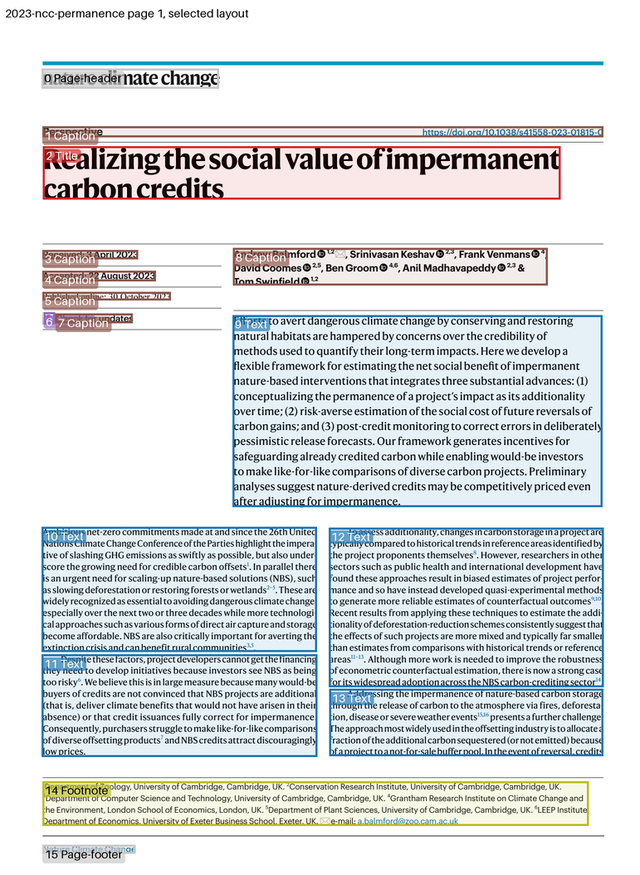
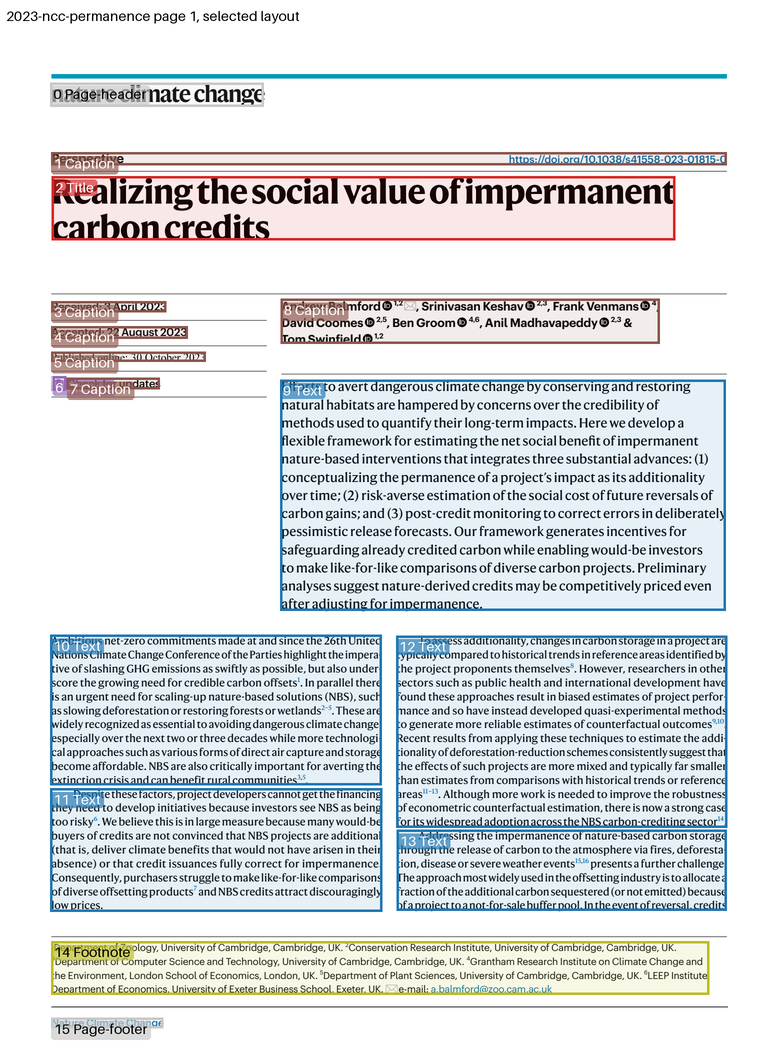
The image below shows the first page of our Nature Climate Change paper on permanence after being parsed, with the masthead, dates, authors, abstract, two-column body and affiliation footnote each separated into their own labelled region.
I've also uploaded the HTML output for six of my papers so you can try out the different outputs. It's a lot of fun seeing the two models converge on a PDF layout for papers with a variety of layouts!
1.2 Try it out
Parsosaur is an MIT-licensed Python package, now available on PyPI, that you can run with uv. It needs a Linux machine with an NVIDIA GPU for the layout model, and a vision language model served over an OpenAI-compatible API. Just stick each PDF in a directory and point Parsosaur at it for it to populate the directory with metadata:
mkdir paper && cp mypaper.pdf paper/
uvx parsosaur paper/ --base-url http://localhost:8000
There will be an index.html in the output directory that's a reading
view, as well as a bunch of other reconstructions such as the JSON and
TEI XML.
The layout model is a download of several gigabytes on first use.
If you also have GROBID, then you can put the GROBID TEI file output beside the PDF
to have it used as yet another accuracy check.
2 Technical details
Let's now look at how Parsosaur works under the hood, and why we need it. The brilliant GROBID software stack, which we already run, is designed to extract metadata from papers. While it gets a long way on titles and authors, it is weaker on structured extraction of body text and figures. On the other hand, while newer AI vision models that convert a whole page as an image are better on average, they still make big mistakes like (e.g.) dropping whole columns silently and so need to be double-checked.
Parsosaur therefore combines three sources of information:
- A small layout model, NVIDIA's Nemotron-3.5-Parse, looks at each page as an image and draws a labelled box around every region, such as a paragraph, a table or a footnote.
- A larger vision language model, Qwen 3.8 27B, is shown each box in turn and transcribes what is inside it. It is told what type of region the box holds, so that a table can be parsed into a columnar format, or a formula as LaTeX. For figures it uses the LLM to determine if structured JSON can be read from it.
- A heuristic engine, aka a set of deterministic rules, that uses the PDF glyphs to repair things the models got wrong. Since the PDF knows where every character is drawn, we use this to cross-check if our fancy machine learning models have missed something!
Both ML models are compact enough to run on local GPUs, which is important as a lot of our paper corpus is closed source and not redistributable.
Parsosaur also does a final pass to figure out the title, authors and abstract, and splits the bibliography into individual references that are cross-linked to the in-text citations. It also caches intermediate results in the paper output directory, to make it easy to add heuristics without having to re-run the more expensive GPU inferences.
2.1 Precision vs accuracy tradeoffs
NVIDIA published a case study of Edison Scientific, who use the same Nemotron model family to feed an AI literature agent. In their deployment, Nemotron Parse supplies both the boxes and the text in a single pass, and the vision model only examines figures, tables and equations.
Their approach is fast, and well suited to answering questions over thousands of papers. Our purpose is to obtain a faithful offline conversion of each paper, such that a domain expert can navigate back to the paper and cross check assertions from the primary sources. We therefore want high fidelity tracking of source locations, and as much accuracy as we can reasonably afford.
2.2 Using the PDF as a referee
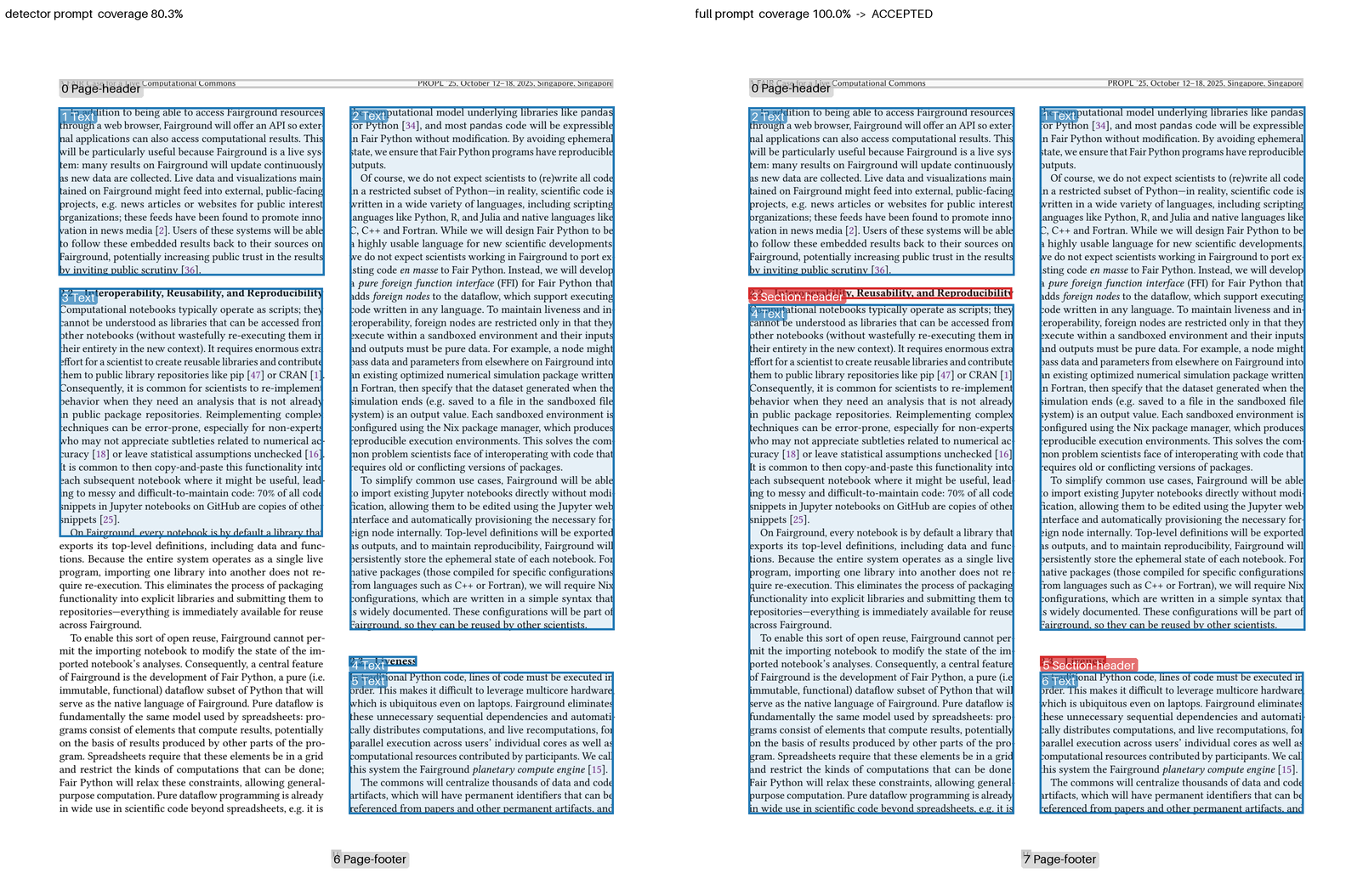
Therefore for every page, Parsosaur counts the fraction of the PDF's characters that fall inside one of the layout model's text boxes. Above 95% (a threshold determined by experimentation), the layout is accepted. Below that, the layout model is invoked in a more thorough mode that's cross-checked against the first.
For example, page 4 of my 2005 IEEE Pervasive Computing article shows the two modes. The layout model boxes the figure and one column of text and then stops, whereas the more thorough run takes longer but finds the unusual magazine layout text with all the glyphs on the page accounted for.
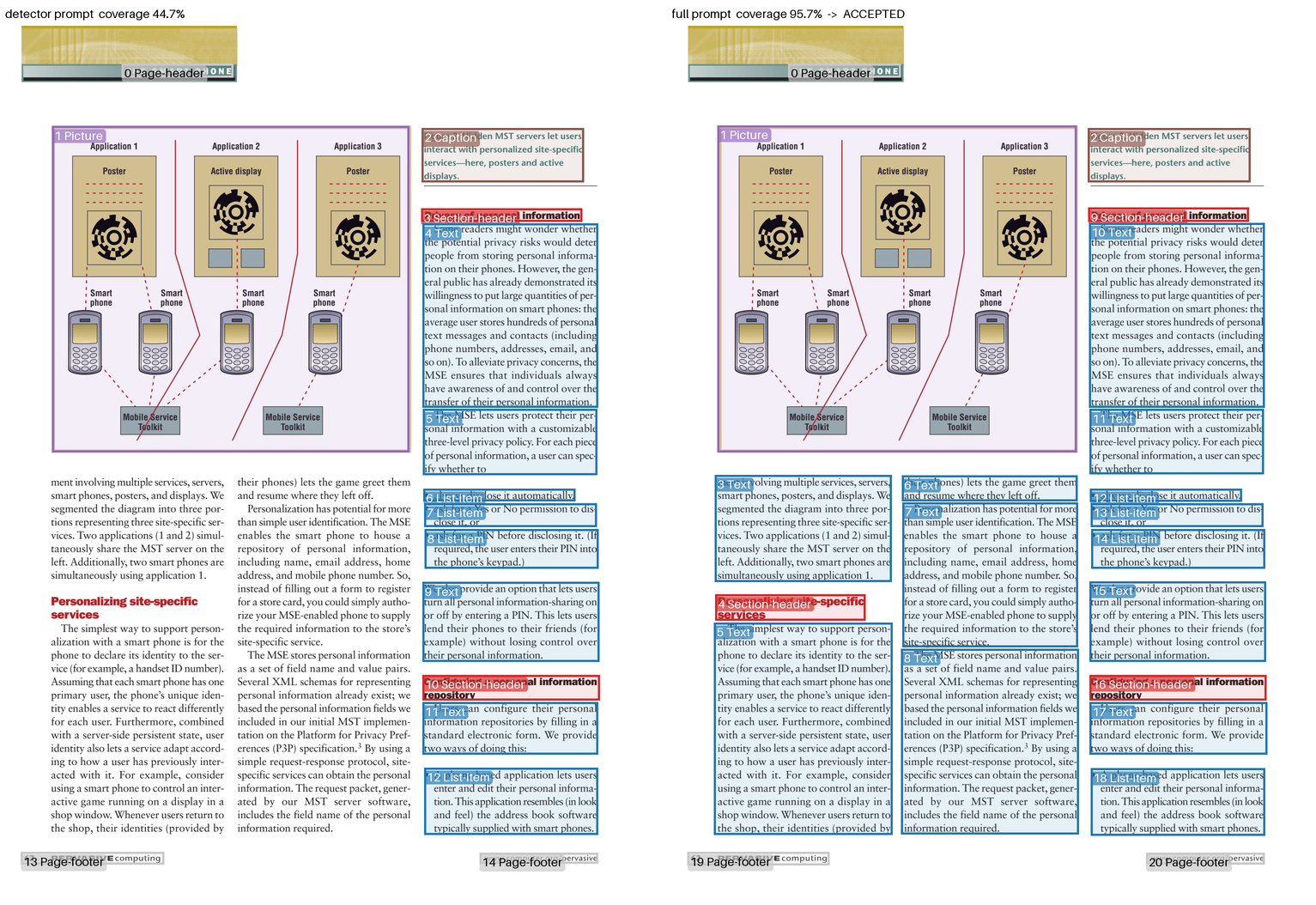
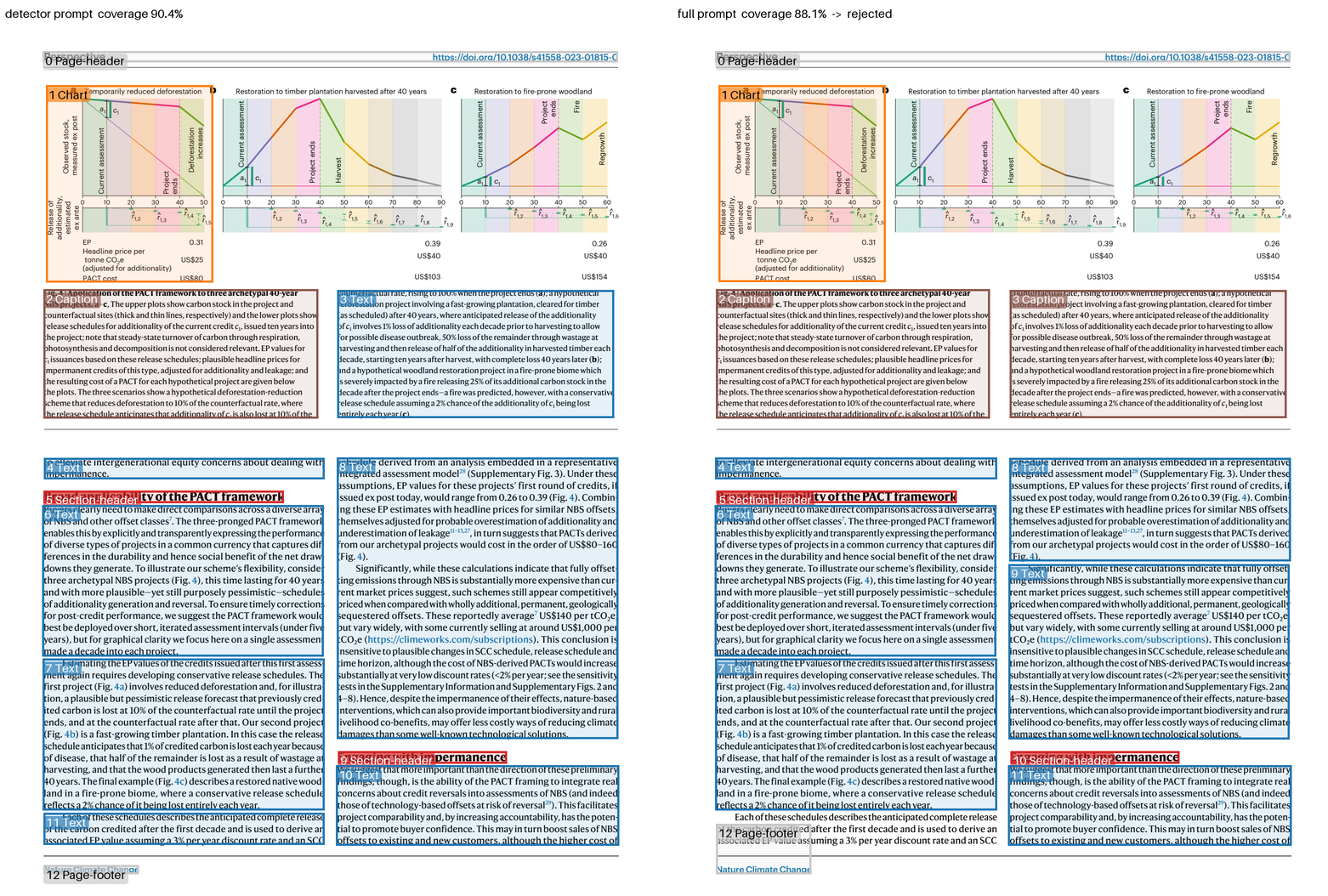
We don't use the "thorough" mode on every page since it is much slower. Over our test set it generally took 3.5-4x as long, and also introduced occasional large new losses on papers that the quick mode handled correctly. The thorough attempt is therefore only made on suspect pages, and only kept if it accounts for more characters than the first.
3 The heuristic engine
Switching between the parsing and the vision models requires some heuristics to bridge the data. We establish a few rules here (arrived at by experimentation) that allow papers from a publisher to be sampled. Since most papers in a journal share similar typesetting, this works pretty well towards getting good structured output.
3.1 Dealing with drop caps and glyphs
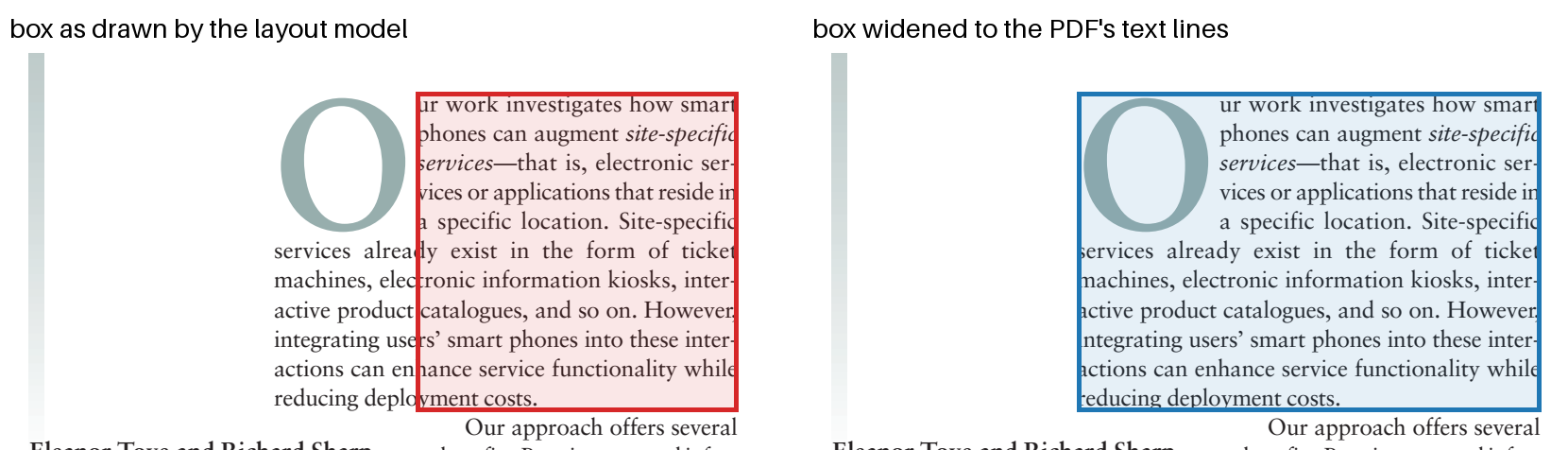
One example of a heuristic is widening boxes to the text. The layout model sometimes draws a box that's too narrow, often when there's a drop cap in the layout. This means the vision model misses text, as it can only read inside the crop. Our heuristic checks whether the PDF has characters just outside a box that are spaced similarly to the rest of that line, and if so widens the box to include them.
Another is spelling names correctly from the PDF text, which is important for unusual glyphs or foreign languages. For example, the vision model read the title of our NPU paper as "Benchmarking Ultra-Low-Power μNPs", but the PDF file's properties had "μNPUs". When the PDF agrees with a transcribed title, heading or author name to within a letter or two, the PDF's spelling wins.
3.2 Disambiguating multiple titles
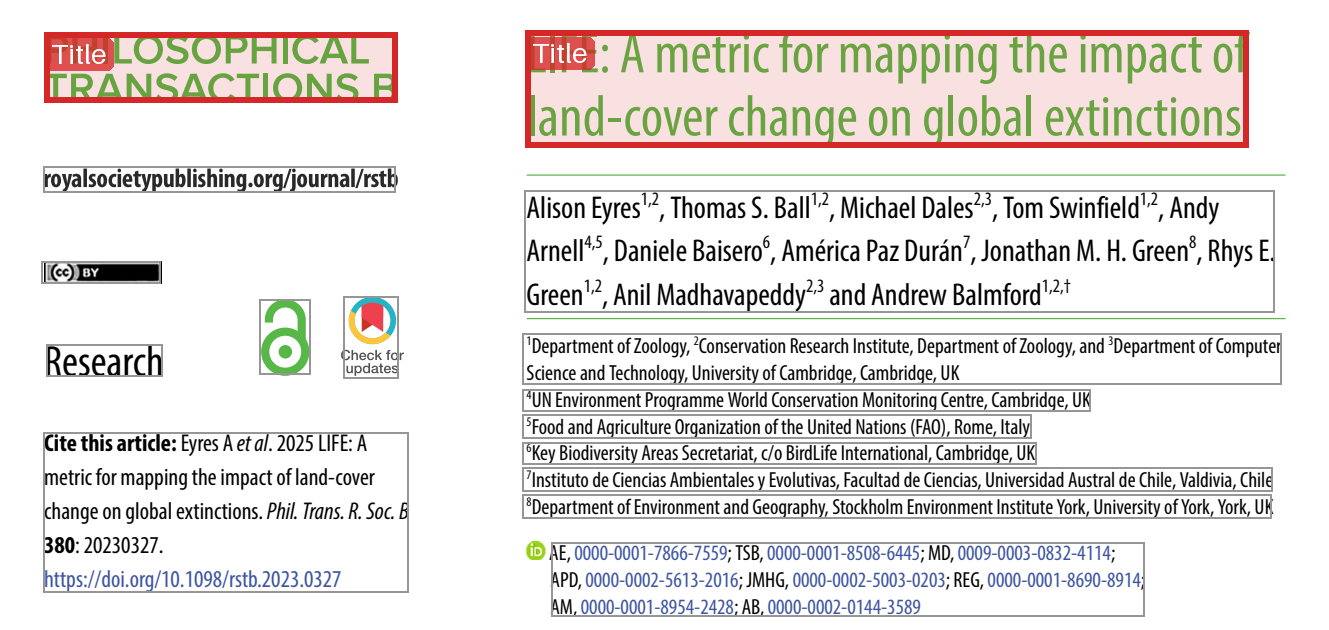
Journals often print their own name as large as the article's title, and the layout model labels both as titles, as it does for our LIFE paper below. The box whose words best match the extracted title is chosen.
3.3 Cross-checking against PDF metadata fields
One obvious win is that we can read the metadata identifiers that the PDF declares. Most journal papers self-identify their own DOI in their metadata, and modern papers also link each author to their ORCID. These are taken straight from the file. A DOI that only appears as a link in the body is ignored as it may belong to a cited paper.
3.4 Double-checking Crossref lookups
GROBID can look papers up in Crossref via biblio-glutton, and for 15 of my 141 papers it returned somebody else's! For example, the NPU paper came back as "Approaches to Improving Nursing Handover in Surgical Wards". This was weird enough to dig into, and it turns out to be multiple chained mistakes:
- First GROBID misread the magazine layout and took the column banner "EXPERIMENTAL METHODS" as the title, and the stock image credit "Photo, istockphoto.com" as a first author called Photo.
- Then the nursing paper's own Crossref record is corrupt, and also lists a first author whose family name is Photo.
- The match score is the mean of the title similarity, the author similarity and the search rank. A surname as rare as Photo matches exactly and ranks first, so (0.21 + 1.0 + 1.0) / 3 = 0.74 was above the 0.7 threshold.
Parsosaur therefore refuses GROBID's record if its DOI differs from the one the PDF declares, or if its title does not match the page. We need to be really careful not to overly rely on any one metadata inferences, as the above chain of results demonstrates!
4 Experiments
This was a very simple experimental setup, primarily just based on a 10,000-page corpus sampled from my papers and Taposaur. The next step is to run this on a much larger corpus to do systematic ablations and establish whether per-publisher heuristics are definitely necessary.
There are some research questions we need to dig into further with a larger corpus.
4.1 Does processing more pages at once change the result?
Each page should be processed independently, but there's a speed tradeoff involved. Laying out 16 pages at a time was 23% faster than 2 at a time, but lost more regions, including bibliography entries. Parsosaur therefore currently processes two pages at a time, but needs more experiments to establish the Pareto frontier (if any) here.
I suspect that as the context window of these later models increases, they'll get better at managing extra pages.
4.2 Is the Nemotron 3.5 model more accurate than the 2.0 model?
When I started this with Sadiq Jaffer, the SOTA model was Nemotron 2.0. I later upgraded to Nemotron 3.5 and compared against the 2.0 version.
| Measured over 146 pages | 2.0 | 3.5 |
|---|---|---|
| Time to lay out every page | 236 s | 142 s |
| Coverage | 95.29% | 96.69% |
| Characters counted twice | 0.81% | 0.03% |
| Word accuracy | 93.62% | 95.17% |
On average the 3.5 model is faster and better, but not always. Coverage did improve on 37 pages, was unchanged on 75 and worsened on 34, but the regressions were surprisingly severe. Version 3.5 lost columns, and merged a table in our NPU benchmarking paper into the chart beneath it. The lost columns also reproduced on a CPU-only run, pointing to the model itself being at fault.
The strong performance results motivated adopting 3.5, but with the heuristic engine and the thorough/quick modes to vary the context window.
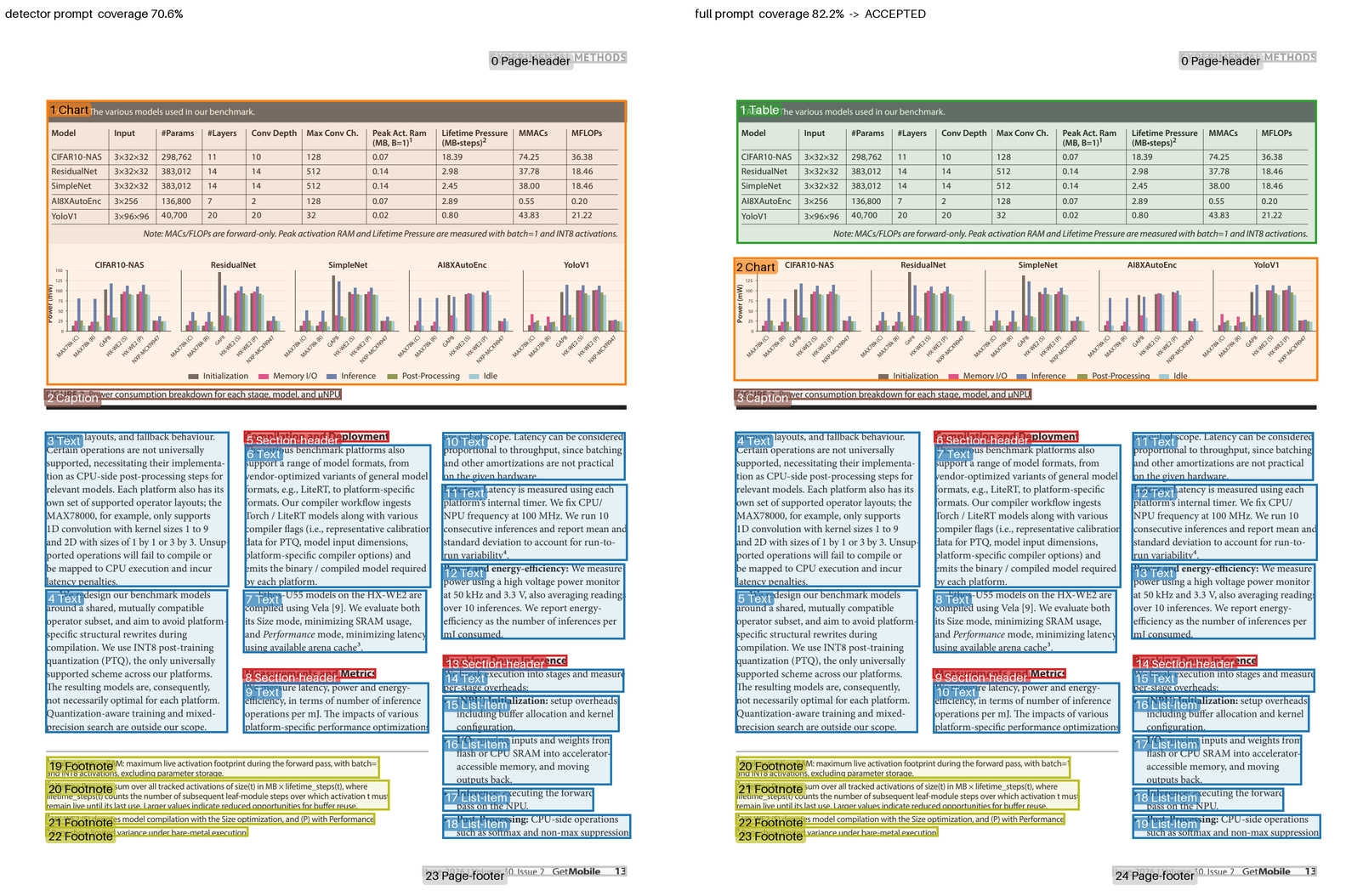
As a secondary question, does retrying only suspect pages keep the gains without the losses? This does work well on Nemotron 3.5. Of the 146 pages, 31 fell below 95% coverage and were retried, and 4 retries were accepted. Coverage rose to 97.47%, no previously found character was lost, the hand-checked table returned to 76 correct cells out of 77, and layout was faster.
4.3 Does providing full text help the vision model interpret figures more accurately?
A little, but not as much as I expected! I think this needs more data to give a convincing result. I gave the vision model the paper's text alongside each figure, and measured how many of the labels printed inside the figure appeared in its corresponding description.
While there was a gain of nine points on the paper test set, tables responded badly since the model began to reconstruct them from the prose and dropped whole columns. Parsosaur therefore supplies the text for figures and formulas but not for tables.
A general purpose frontier LLM has no problem with these layouts, but the smaller models do struggle and need these heuristics. This is also unsatisfying, but necessary due to our need to run on local GPUs only!
5 Related work
There are broadly three ways to get the text out of a PDF paper. The classical one, used by GROBID and Semantic Scholar's PaperMage, trusts the PDF's embedded text and trains models to label it semantically. Independent comparisons of extraction tools and of PDF parsers agree that this works well for metadata and references, and poorly for anything that depends on layout. Unfortunately, lots of journals have weird and wonderful layouts!
The second way ignores the embedded text and reads the page as an image, as Nougat, olmOCR and Nemotron Parse do. This copes with any layout, but a fluent model will also rewrite things, which is how we ended up with "μNPs" and also works poorly for foreign languages.
The third finds the regions first and then reads each one separately, as in MinerU 2.5, PaddleOCR-VL and Docling, and is the one we follow.
Where Parsosaur differs is in combining all the methods with heuristics, which is quite agent-friendly. We use image models to do the reading, and the embedded text serves to double check. Existing benchmarks such as OmniDocBench and PureDocBench rank PDF parsers by their average score, but for for evidence synthesis we really need to avoid outlier results that might be hidden by an averaging.
6 Onwards to millions of fulltexts
This post just rounds up the results on a few hundred papers. The next step is to run this on a much more significant corpus, and figure out how to validate them at scale. For the Evidence TAP, every page therefore needs a cheap (and as independent as possible) signal that encourages a human to douvle check it.
I'll next try running Parsosaur over the Conservation Evidence butterflies and moths corpus, which the team knows well enough now to eyeball things rapidly! Much of this would be unnecessary if publishers simply gave us the structured text they already hold, but until then, we parse as best we can!
Thanks very much to Sadiq Jaffer for much help with all of this, and also to the wider CE team, especially Sam Reynolds and Alec Christie for helpful discussions about approaches to this parsing. While Parsosaur should strictly still be considered a research prototype, I'm going to iterate on it more in the coming months. Please do get in touch if you're working in a similar area and want to compare notes.