
Yesterday's monopam workflow used git submodules to combine vendored packages, but was awkward to use for crosscutting changes involving lots of vendored git repositories. Today I asked what agentic code development would look like if we could unify all code into a single git repository, where upstream packages become branches instead of submodules. I've open-sourced the unpac CLI to explore this, and have begun using it myself.
Coding agents work best when all relevant code is locally available so they can grep and make cross-cutting changes. I first noticed this when building Bonsai terminal UIs and Mosaic, where I had to manually assemble monorepos just to get the agent working. Things come to a crashing halt when package management gets involved; the tool calls for web search are far slower and unreliable. This means that the agent doesn't really have a good view on what third-party packages might be useful to solve a problem, leading to the common complaint that LLMs reinvent the wheel.
To fix this, unpac parses package metadata and materialises it into a git branch structure in a single repository to make vendoring, patching, and updating a native git workflow. Local changes can later be exported into git patches for sending upstream, but in the meanwhile our agents can work on a single repository.
The secret sauce to working on so many branches is to use git worktrees, which allow multiple branches to be checked out simultaneously from one git repo! I'll explain how unpac works next, and you can browse a working unpac tree. You do end up with a lot of git branches, which got me banned from GitHub back when I announced Docker DataKit. Luckily this time around I am hosting on Tangled where I host my own Git remotes and so don't have to worry about third-party SLAs!

1 The unpac branching model
unpac organises code and dependencies using a lot of unrelated git branches, with
careful merging across them. The main branch only holds the unpac metadata about which projects exist and which opam remotes to use.
While this defaults to the upstream opam-repository, I'm also using this with the oxcaml/opam-repository and my aoah-opam-repo overlays (maintained via the opam metadata skill) to help track community forks.
[opam]
compiler = "5.4.0"

[[opam.repositories]]
name = "opam"
path = "/workspace/opam/opam-repository"

[[opam.repositories]]
name = "aoah"
path = "/workspace/opam/aoah-opam-repo"
Each third-party opam package then has three branches in my unpac repo:
upstream/opam/<pkg>holds the unmodified upstream code and historyvendor/opam/<pkg>is upstream history relocated to avendor/opam/<pkg>/prefix using git-filter-repo.patches/opam/<pkg>is the vendor branch with any local changes applied.
The projects you are working on are all in a project/<name> orphan git
branches, independent of all the others. Adding a dependency to a project is a mere matter of
merging the vendor branch for a given dependency into the project branch.
This merging will materialise the dependency code in the project branch
conflict-free under vendor/opam/. This allows us to build a monorepo of OCaml
code that's maintained its git history across all the different developers,
while also allowing local commits to be held and rebased. The agent has a ton
of context available to it now without having to go to the outside world!
1.1 Working on multiple branches simultaneously with worktrees
Before showing off the unpac CLI, it's worth explaining git worktrees as I'd never used them before today. Normally, you can only have one git branch checked out at a time, but worktrees free us of that restriction:
A git repository can support multiple working trees, allowing you to check out more than one branch at a time. With
git worktree adda new working tree is associated with the repository, along with additional metadata that differentiates that working tree from others in the same repository. The working tree, along with this metadata, is called a "worktree".This new worktree is called a "linked worktree" as opposed to the "main worktree" prepared by git-init or git-clone. A repository has one main worktree (if it's not a bare repository) and zero or more linked worktrees. When you are done with a linked worktree, remove it with
git worktree remove. -- git-worktree documentation, 2023
Creating them is pretty straightforward using git worktree add. This creates
a new checkout with the .git entry being a file containing an entry
like:
gitdir: /workspace/git/worktrees/tuatara
Without worktrees, agents fall over themselves switching branches due to the requirement that all files be committed before switching. With worktrees, you can have uncommitted stuff in multiple branches, meaning we can simultaneously view upstream code while making patches, compare vendor and patches branches side-by-side with diff, and work on multiple projects from the same repository. I used to have these affordances back when I used Mercurial and Perforce (with different distribution models, admittedly), so it's great to have it back!
2 Using unpac via the CLI
This elaborate git schema is all very good, but not something I'd want to manage manually. The unpac CLI takes care of all the gruntwork involved, including integrating an opam solver to create 100s of branches with one command. Let's take a look at an example project:
$ unpac init

# Vendors in packages from opam including dependencies
$ unpac add opam eio --solve
We now have a bunch of vendor branches in our local repository, and need to create a project to use them:
# Create a new project branch
$ unpac project new myapp

# Merge in the patch branches of these dependencies into project/myapp/vendor
$ unpac opam merge eio --solve myapp

# Hax0r like it's 2026 on your project
$ cd project/myapp

3 Doing agentic monorepo development
We can now do a simple dune build in the project/myapp directory since all our code is present in one working branch.
A typical unpac project looks like:
.
└── dune-project
├── vendor/
│   ├── eio/            # vendored eio source
│   ├── lwt/            # vendored lwt source
│   └── ...
├── src/                # your project source
Dune automatically discovers and builds the vendored packages. No special configuration is needed beyond standard dune files.
However, some packages don't build with dune since the upstream projects don't use dune but have other build systems (quite reasonably! Choice is important). In the past, I have maintained over 50 dune ports via opam overlays, mostly by hand. However, I can now easily use my coding agent to do all the porting automatically.

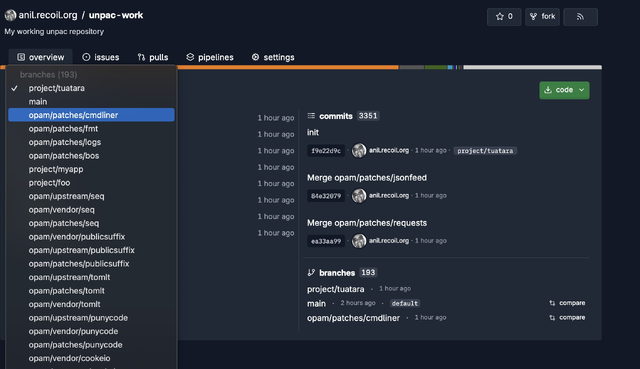
You can see some of the diffs in the patch branches in my working tree: patches/logs or patches/cmdliner or patches/bos for example. Since the agent has a clean local interface to work with, it can keep its commits neatly organised.
An unpac vendor status command neatly summarises the status of which packages have been patched, and which project they're merged into:
$ unpac vendor status
Package                    Patches   Merged into
----------------------------------------------------------------------
angstrom                         0   -
asn1-combinators                 0   myapp
astring                          0   -
base64                           0   myapp
bigstringaf                      0   -
bos                              1   -
bytesrw                          0   -
bytesrw-eio                      0   -
ca-certs                         0   -
checkseum                        0   -
cmdliner                         1   tuatara
conpool                          0   -
cookeio                          0   -
csexp                            0   myapp
cstruct                          0   -
decompress                       0   -
digestif                         0   myapp, tuatara
domain-local-await               0   -
domain-name                      0   myapp
You can see here that cmdliner has been patched and merged into the tuatara
project, but bos has been patched and is unmerged. This is all calculated
internally via git commands, so there's no separate metadata store to get out
of sync.
I haven't completed porting all the third-party packages to use dune just yet, but I've left it running overnight. When that's done, the big feature we gain is that a dune build can seamlessly cross-compile binaries since all the OCaml code and C bindings are in one place. This is what MirageOS 4 does, and we can reap the benefits now for conventional binaries too. Windows builds should also be a lot easier as long as the dune rules don't have too many Unixisms.
3.1 Importing existing projects
The unpac CLI was self-explaining enough that another agent session could import an OCaml project by analysing that project and running the sequence of unpac commands.

In order to reduce the load on external git clones, unpac also supports having a local "git branch cache" which pulls remotes just once, and then all unpac invocations pull from that local store. As an experiment over the holidays, I've left a session doing a slow clone of all opam git remotes, to see how well git scales to a few thousand branches.
3.2 Pushing the results
We do end up with 100s of local branches, and so an unpac push command checks which ones need pushing and takes care of it for you.

You can browse one of my working unpac repositories on tangled/anil.recoil.org/unpac-work to get a sense of the structure.
I'm still working on the pulling/rebasing functionality, but the basic idea is all the same: pull from the outside world into a pristine branch, relocate the directory, and then have local patch branches.
4 Integrating OCaml with other languages in one repo
The current unpac focuses on opam, but Ryan Gibb has been leading the research on a generalised packaging language that can describe package management across ecosystems. Imagine something like this in a future unpac:
# Works with opam, npm, cargo, pip...
dependencies = [
  { source = "opam", name = "eio", version = ">=1.0" },
  { source = "npm", name = "d3", version = "^7.0" },
  { source = "cargo", name = "tokio", version = "1.0" },
]
I've already had need for this last week when I vibespiled 50 HTTP libraries across 10 languages into an OCaml implementation. I really want to be able to more easily draw from other language ecosystems, and unpac's git branch model works regardless of the package manager (hence the opam/ suffix for vendor/ branches).
5 Reflections

Unpac's branching model actually doesn't work hugely well with GitHub due to the storage limits on an account being hit pretty fast, but it's peachy when used with self-hosted Git services. I'm sure we could do something with Git object alternates as well to improve on this in the future.
There's quite a lot of work required to make unpac production grade, but I'm astounded by how quickly I could put this prototype together in a day. Sketching out CLI tools and cram tests is extraordinarily fun as well, as I could specify my desired user interface and then engage in a Socratic dialogue with the agent to refine the specification.
I'm also having subversive thoughts now about issue management. I've been a fan for many years of Jane Street's Iron code review system. However, despite having talked to Stephen Weeks and Yaron Minsky extensively about it over the years, I've never found the bandwidth to build an equivalent for open source. But with coding agents being able to interpret natural language alongside code, it seems like a really obvious extension to also store issues within branches as well as code, and to unify our agent context horizon. Something for the 2026 queue!
I'd love to hear any feedback on unpac's model from other projects. I wouldn't use the tool I've released just yet as it's only about 18 hours old, but I'll work on it more in the new year as well and do a proper release once it's self hosting. Many thanks to Ryan Gibb and Patrick Ferris (who came up with the name) for several design discussions that lead to this post.
6 Feedback (25th Dec 2025)
Some useful comments about this post:
First, Török Edwin from the XenServer team reports that:
XAPI has 2 invalid commits in its commit history (invalid email address containing a duplicate of the author name and email), so it is impossible to push its history into a brand new GitHub repo, you can only do that by forking the original repo through the API. Although I see you are not using GitHub, so you might be fine. Still might be a good idea to run
git fsckon the final repo, XAPI may not be the only project with some invalid commits in its history, and that could create problems later (e.g. iftangledstarts runninggit fsck)".
Something to investigate for the new year: antagonistic git remotes! Then, Michael Dales notes that:
For any production system I’ve had to deliver, I’d always vendor in third part code using git submodules (and those taken from a local mirror of each repo). You just can’t use external dependencies if you need to know you can ship updates to customers at the drop of a hat, and you never know when an open source project might go away.
And then Dave Scott reminded me how much this proposed branch scheme makes it easier for shipping products to comply with open-source licenses. In Docker for Desktop we have an elaborate license gathering script for the 'about' box to credit contributors.