
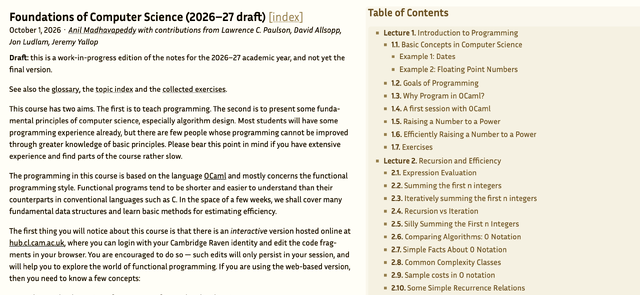
I've heard good feedback from my undergrad students about how Jon Sterling publishes his 1A Discrete Maths lectures in a structured online form using his own Forester tool. As my sabbatical comes to an end, I've started prepping my own Foundations of CS course[1] for resuming lecturing in October. I ported this course to Jupyter a few years ago along with a nice printable set of notes with the same content.
Over the last week, I've experimented with porting the Markdown FoCS lecture sources over to use Forester instead. I like Jon's perspective on evergreen notes, and also the idea of interlinking concepts across lecture courses eventually.
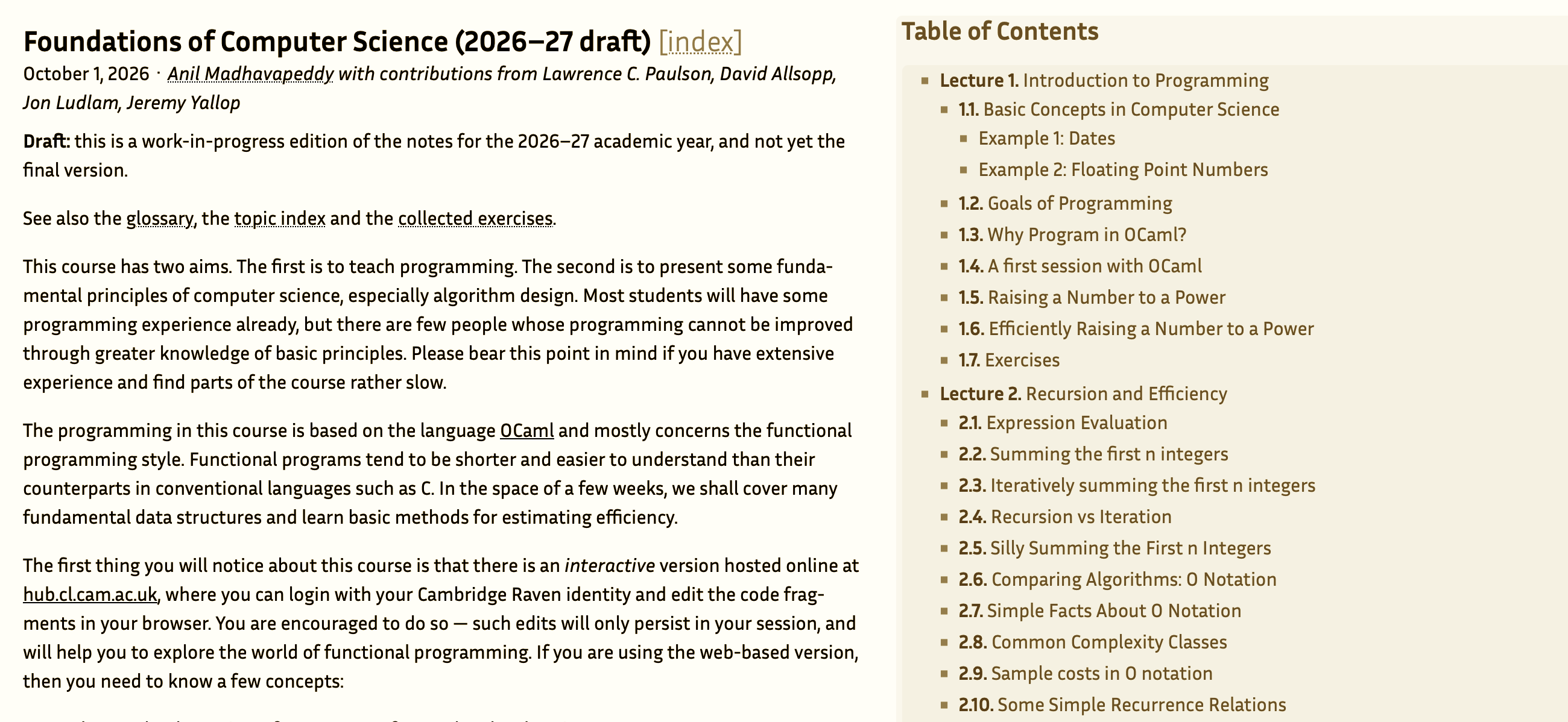
This is now online as a draft interactive forest of the 2026–27 notes. First, I'll jot down notes on how forests are structured, then on making the forest into a live program by embedding the OCaml compiler into the browser, and finally on publishing it all as a static site.
1 How are forests structured?
There's a really good overview talk from a couple of years ago to get you started. The basic idea behind Forester is to structure notes as a series of transclusions. A document isn't written top-to-bottom but instead assembled from trees that include other trees by reference.
The syntax to do this is a LaTeX-like \transclude{addr} that splices the
tree at addr into the local note as a section. Headings, numbering and depth are computed
from where the transclusion appears and not where it is written down in the filesystem.
The Forester format is a bit of a departure from Markdown, which others have noted. Patrick Ferris maintains a frontend to Forester called Graft, which converts Markdown into the native Forester format. I decided to go fully in and commit to the Forester syntax while I find my way around!
My original lecture notes use a traditional linear Markdown format, e.g.:
# Lecture 3: Lists

## Append: List Concatenation
...etc
The section numbering you see in the PDF version (where this is "3.5") was computed later in the LaTeX build, so the Markdown sources have no stable way to refer to a section beyond direct links to the section name.
In the new FoCS forest, every section now has its own tree file. A lecture tree is just
the title plus a list of transclusions; e.g. in focs-lists.tree we have:
\title{Lists}
\taxon{Lecture}
\author{anil-madhavapeddy}

\transclude{focs-list-primitives}
\transclude{focs-head-tail}
\transclude{focs-append}
...
A leaf with some content like focs-append.tree is straightforward:
\title{Append: List Concatenation}
\author{anil-madhavapeddy}

\pre{\startverb
# let rec append xs ys =
    match xs, ys with
    | [], ys    -> ys
    | x::xs, ys -> x :: append xs ys
val append : 'a list -> 'a list -> 'a list = <fun>
\stopverb}

\p{Patterns can be as complicated as we like.  Here, the two patterns
are \code{[], ys} and \code{x::xs, ys}.}
This means that the same content now renders in two separate contexts. First, it's section 3.5 inside the Lists lecture, and also a standalone page with a stable URL that can be linked, tagged, queried and (eventually) evaluated.
On the standalone page, Forester automatically adds a "Context" backmatter section embedding the parent lecture, so a reader always knows where a fragment was transcluded from. As we'll see later, the live-code machinery uses this feature to also build up a live programming environment even for isolated fragments.
For small trees not worth their own file, we can also use \subtree[addr]{…} to declare an
addressable tree inline. I use this for per-lecture exercises, e.g. in focs-ex-3.tree:
\title{Exercises}
\put\transclude/toc{false}

\subtree[focs-ex-3-1]{
\title{Summing a list}
\taxon{Exercise}
\tag{lists}
\tag{recursion}

\p{Code a [recursive function](focs-def-recursion) to compute the sum of
a list's elements. ...}
}
Despite being defined inline, focs-ex-3-1 remains a full Forester citizen and
has its own URL and shows up in the "Summing a list" backlinks of the
definition trees it links to. Forester in general feels like it has a good
internally consistent model that all this syntax maps to.
1.1 Transclusions allow Forester to number sensibly
Notice the titles above carry no numeric titles like "3.5". Just like in LaTeX, Forester numbers transclusions contextually, so the same tree renders as (e.g.) "3.5" inside its lecture and unnumbered on its own page.
I needed an exception for the exercises, as numbering each individually was too noisy. This was easy enough; I gave them each a title and then just marked them as requiring a collapsed rendering by default so the ToC can focus on the content and not exercises.
\put\transclude/toc{false}                % keep out of the table of contents
\scope{\put\transclude/expanded{false}
  \transclude{focs-ex-3}}                 % render collapsed
1.2 Adding tags and metadata to forests
My original Markdown lectures had no metadata at all, which made converting them to a richer format difficult. With Forester, every section and exercise tree now carries a few tags that describes that section a bit better. I'm going to match these to our syllabus tags (which are also used in examination rubrics) once the editing settles down.
\title{Append: List Concatenation}
\author{anil-madhavapeddy}
\tag{lists}
\tag{recursion}
\tag{complexity}
1.3 Cross references refer to stable IDs
One very cool aspect of Forester is that inline cross-references aren't too distracting from the main prose. We can do HTML-style wrapping very easily.
For example, the Markdown version couldn't deep link easily due to not knowing what the output format was:
Write a version of function `power` (Lecture 1) using `while`
instead of recursion.
In the Forester version, this uses the stable id:
\p{Write a version of function \code{power} (\ref{focs-intro}) using
\code{while} instead of [recursion](focs-def-recursion).}
The Forester renderer reads the target's \taxon and contextual number and stays correct even if lectures are reordered.
1.4 Making definition trees and glossaries
We can then do further tagging to add useful index pages for core concepts:
\title{Tail recursion}
\taxon{Definition}
\tag{recursion}

\p{A recursive function whose computation does not nest is called
\em{iterative} or \em{tail-recursive}: ...}
All of the mentions across the course then link to this definition, and Forester's automatic backlinks give us the reverse index for free. The glossary page uses a fancy datalog query engine that appeared in Forester 5.0:
\title{Glossary}
\query{\datalog{?x -: {\rel/has-taxon ?x '{Definition}}}}
The same query method also builds a "collected exercises" page (has-taxon Exercise) and
a topic index (one has-tag query per tag). These pages update themselves as trees are added just as you'd expect with any other database driven query.
2 Making the Forest a live program
The Markdown's code blocks are mdx-checked toplevel transcripts, which means that the output of some OCaml code is actually compiled and verified. This was formerly done on the server side, but we can compile OCaml into the browser very easily to embed the compiler into the output Forest!
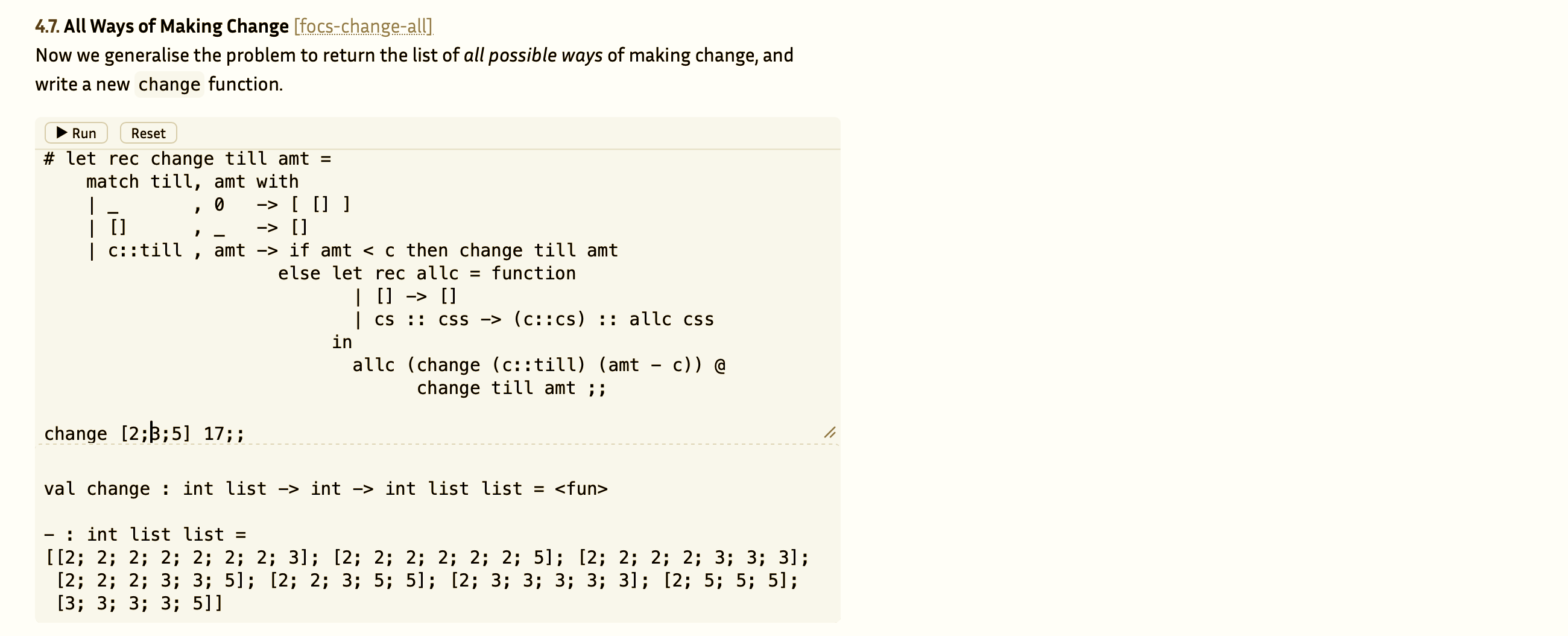
First, the syntax is a little different and more LaTeX-like. The original mdx Markdown was:
```ocaml
# let x = [3; 5; 9]
val x : int list = [3; 5; 9]
```
and the corresponding Forester looks like this:
\pre{\startverb
# let x = [3; 5; 9]
val x : int list = [3; 5; 9]
\stopverb}
Forester outputs XSL which is rendered into HTML via browser stylesheets. In order to make this work with Js_of_ocaml, we first need a basic toplevel.
This is very straightforward, with a dune file that has linkall specified
to stop unused modules being dropped, since we need everything in the Stdlib
available in an interactive toplevel. However, it occurred to me that it might
actually be useful to drop OCaml Stdlib modules as well for the purposes of FoCS,
since we build up the standard library for ourselves through the course. Something
for the next iteration!
(executable
 (name focs_toplevel)
 (modes byte)
 (link_flags (-linkall))
 (libraries js_of_ocaml js_of_ocaml-toplevel))

(rule
 (targets focs-toplevel.js)
 (action (run %{bin:js_of_ocaml} --toplevel %{dep:focs_toplevel.bc} -o %{targets})))
The toplevel itself is extremely straightforward, as we just need to register a JavaScript callback and ensure we also preserve the compiler error messages for the toplevel:
let execute code =
  let buf = Buffer.create 256 in
  let fmt = Format.formatter_of_buffer buf in
  Sys_js.set_channel_flusher stdout (Buffer.add_string buf);
  Sys_js.set_channel_flusher stderr (Buffer.add_string buf);
  JsooTop.execute true fmt code;
  Buffer.contents buf

let () =
  JsooTop.initialize ();
  Js.Unsafe.set Js.Unsafe.global (Js.string "focsExecute")
    (Js.wrap_callback (fun s -> Js.string (execute (Js.to_string s))))
Then, running js_of_ocaml --toplevel embeds the stdlib's cmi files so the typechecker
works in the browser. It's not lightweight, about ~9 MB raw and ~2 MB gzipped but it's lazily loaded the first time a toplevel is clicked.
As a quick hack (aka 'hydration' in JavaScript parlance), there's a script that scans for <pre> lines that start with a hash and marks those as editable. This involves rewriting that HTML with a component that
has an editable code area, a Run button, and an output pane pre-filled
with the OCaml's expected output. Although an anachronism these days, this
technique also lets browsers with JS disabled still work reasonably.
2.1 Allow snippets to work as well
This all works with notebook-like semantics when viewed from the main page. Clicking on any item runs a block and first replays any previous codeblocks to fill its environment with relevant type and function definitions.
However, Forester supports transclusions, which means that we might not be viewing the page as one giant list of sections! And indeed, clicking through to one of the subpages showed that the OCaml toplevels broke as they couldn't find their old function definitions.
To get around this, we can declare metadata tags so that the Forest tree declares its dependencies in the forest source; e.g. the tree lookup section needs the earlier binary tree definitions in its toplevel environment:
\title{Lookup: Seeks Left or Right}
\tag{dictionaries}
\meta{ocaml-deps}{focs-binary-trees}
Forester carries these \meta tags into the output page XML as
<fr:meta name="ocaml-deps">focs-binary-trees</fr:meta>, so the JavaScript
can look through its own source and recursively resolve
each dependency's transcripts for the toplevel.
This did require me to annotate trees with ocaml-deps incrementally,
but this is good hygiene anyway and could be automated if I used a build
system in the future for the OCaml snippets.
2.2 Good web standards from Forester
One interesting thing about Forester 5.0 is that it emits XML rendered by the browser via XSLT, and not HTML directly.
This is very elegant, and it's just as easy to add the output js_of_ocaml.
There's a theme directory for the forest, so the integration is a couple of
lines in the tree.xsl that does the transform:
<script type="module" src="{/f:tree/@base-url}forester.js"></script>
<script type="module" src="{/f:tree/@base-url}ocaml-live.js"></script>  <!-- added -->
The last time I hacked on DocBook XSLT was back in 2001, so this was a bit of a blast from the past...
Fortunately, when Chrome finally finishes its strongarming of web standards and removes XSLT later this year, the same stylesheet can still be compiled into HTML at build time via xsltproc.
3 Publishing the Forest to the web
All the Forester output is a static website, so I just uploaded it to my Computer Lab account.
One mini gotcha is that in the forest.toml configuration, the site URL must end with a trailing slash
or else the output is corrupted (it bakes in the absolute URL but I've not checked why):
[forest]
trees  = ["trees"]
assets = ["assets"]
url    = "https://www.cl.cam.ac.uk/~avsm2/fcs/"
This has all worked out pretty well. The only thing left is to discuss how to handle our tick system with Jon Ludlam. I'm going to have a go at porting over Real World OCaml to this as well, to see if it makes managing the refresh of that book a little easier...
You can find the Forester source on Tangled as well as the Markdown frontend Graft if you want to try this out for yourself.
(Update 16th Aug 2026: Both Patrick and Jon corrected me that Graft isn't a fork of Forester, but a frontend that converts from Markdown syntax to Forester syntax. If I'd understood that before doing my native Forester port I could probably have saved a bunch of time. Mea culpa!)
-
I took over Foundations of CS from the great Larry Paulson back in 2018 or so. My notes are ported from his original course!
↩︎︎